PTO for Hourly Employees: Calculation, Laws, and How It Works


SMALL BUSINESS INTEL, IN YOUR INBOX
Table of contents
If you think paid time off is just for salaried office workers, think again. PTO for hourly employees is becoming the norm—and for good reason. It helps you compete for top talent, reduce turnover, and build a team that actually wants to stick around.
But here's where it gets tricky: calculating PTO accruals, navigating state laws, and managing time-off requests without a system can quickly turn into a mess.
This guide breaks down everything you need to know about PTO for hourly workers—from the basics of how it works to step-by-step calculations and the policies that keep everyone on the same page.

TL;DR: How PTO works for hourly employees
PTO lets hourly workers take paid time off for any reason—vacations, illness, appointments, or emergencies—while still earning their regular wages. Unlike traditional leave policies that separate vacation days from sick days, PTO combines everything into one flexible bucket.
Here's what every small business owner should know:
- Legal requirements vary by state: While federal law doesn't require PTO, states like California, New York, and Washington mandate paid sick leave for all employees, including hourly workers.
- Standard calculation through accrual: Most businesses use 1 hour of PTO for every 40 hours worked (equals about 5-10 days annually for full-time employees).
- Competitive advantage: 38% of part-time employees don't get any paid leave, so offering PTO helps you attract better candidates and reduce turnover.
- Simple payment structure: Hourly employees get paid their regular hourly rate for PTO hours used (no complex calculations needed).
- Digital tracking prevents errors: Manual spreadsheets break down quickly with multiple employees—automated systems handle calculations and compliance automatically.
Ready to implement PTO that works for your team? Keep reading for detailed setup instructions and state-by-state requirements.
What Is PTO and How Does It Work for Hourly Employees?
Paid time off is time away from work where employees still get paid their normal hourly wage. The beauty of PTO is its flexibility—employees use their available PTO hours for any reason without having to justify why they need time off.
PTO vs. Other Types of Leave
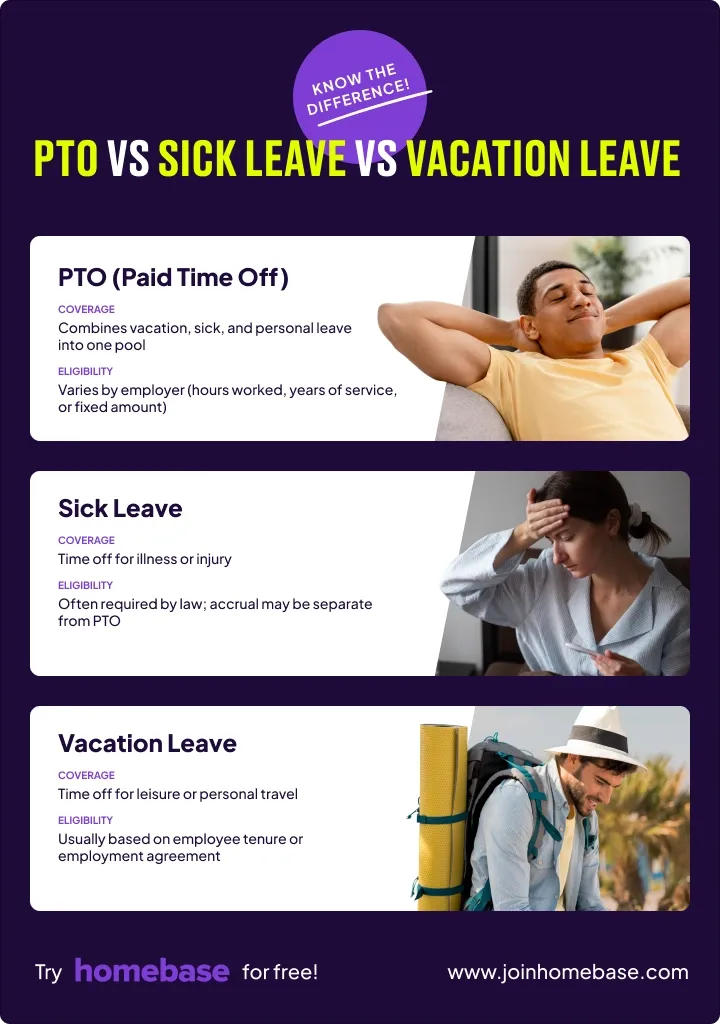
PTO for hourly employees tend to fall in one of two categories:
- Most hourly employees earn PTO through accrual systems where they earn PTO gradually as they work. For example, a common setup is 1 hour of PTO for every 40 hours worked.
- On the other hand, some businesses use frontload systems that give employees their full PTO allowance at once at the start of the year or on their work anniversary.
Most businesses let employees use PTO as soon as it's earned, though many implement a 90-day waiting period for new hires.
PTO Laws and Requirements for Hourly Employees
Federal law doesn't require employers to offer PTO. However, many states and cities now mandate paid sick leave or PTO:
- California leads the pack. Employees earn at least 1 hour of paid sick leave for every 30 hours worked and can start using it after 90 days.
- New York requires 1 hour per 30 hours worked. The amount varies by company size and net income, for example, employers with 5-99 employees must provide up to 40 hours of paid leave per year.
- Washington mandates 1 hour per 40 hours worked. While employees begin accruing sick leave immediately from their first day of employment, they cannot use accrued leave until completing 90 calendar days of employment.
- Other states with requirements include Connecticut, Massachusetts, Rhode Island, Vermont, New Jersey, Maryland, Arizona, and Oregon. Many cities like San Francisco, Chicago, and Seattle have their own ordinances that exceed state requirements.
Part-time employees are covered by many state and local laws, earning PTO at the same rate but accruing less total time because they work fewer hours. A part-time employee working 20 hours per week earns about 26 hours annually versus 52 hours for full-time employees.
How to Calculate PTO for Hourly Employees
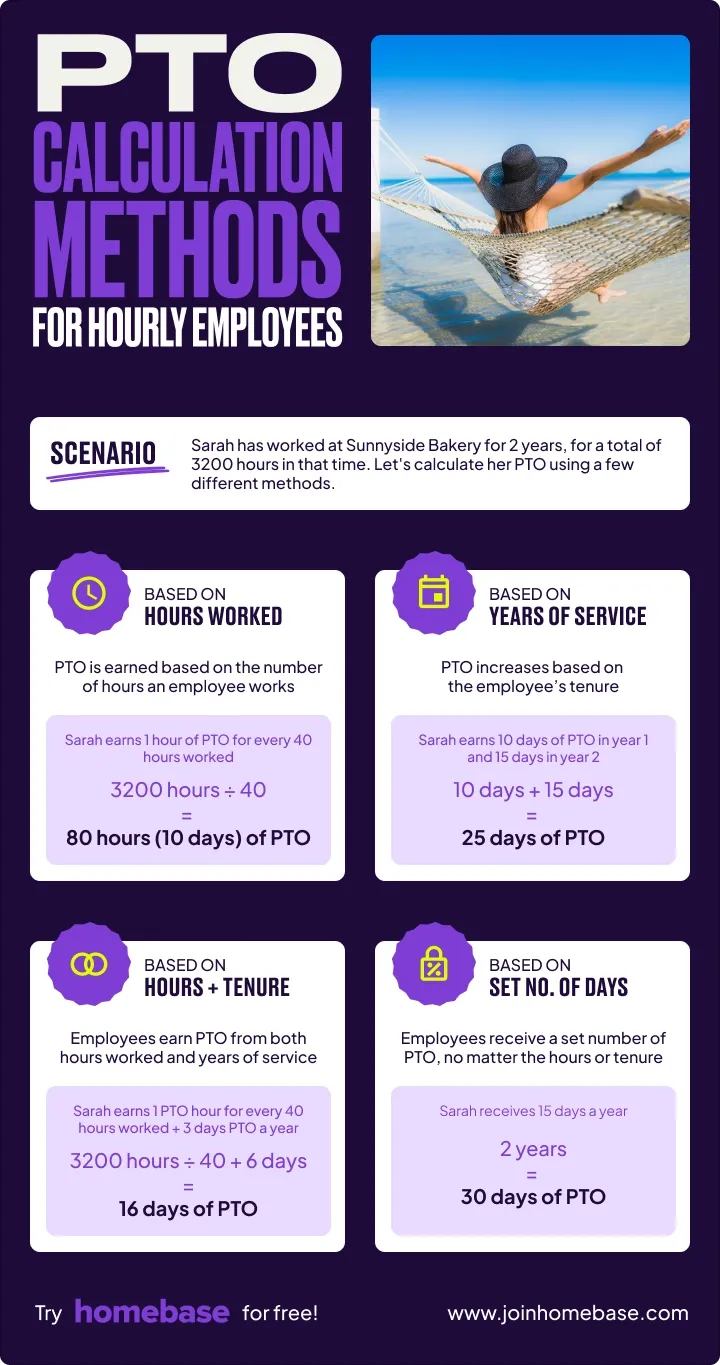
Getting PTO calculations right matters for both compliance and employee trust. Most businesses use accrual systems where employees earn PTO gradually based on hours worked, though the specific rates and methods vary.
Understanding the math behind PTO accruals helps you build fair policies and avoid payroll mistakes.
PTO Accrual Methods and Rates
The accrual rate determines how quickly employees earn PTO hours, with most businesses choosing between generous, standard, or tenure-based approaches. Your rate affects recruiting competitiveness, labor costs, and how much time off employees can actually take.
Here are the most common accrual methods.
Accrual based on hours worked is the most popular approach:
- 1 hour of PTO per 30 hours worked (generous—about 69 hours or 8.6 days per year for full-time)
- 1 hour of PTO per 40 hours worked (standard—about 52 hours or 6.5 days per year for full-time)
Tenure-based accrual rewards loyalty by increasing PTO with years of service (40 hours in year 1, 60 hours in years 2-3, 80 hours for 4+ years).
Standard benchmarks: 5-10 days per year (40-80 hours) is most common for hourly employees in their first year. 10-15 days per year (80-120 hours) is competitive for employees with 2+ years of service.
Step-by-Step PTO Calculations
Once you've chosen an accrual rate, the actual calculations follow a simple formula based on hours worked. These examples show how the math works for both full-time and part-time employees.
Understanding these calculations helps you set accurate expectations and avoid disputes about available PTO.
Basic formula: Total hours worked ÷ Accrual rate = PTO hours earned
Example 1: Full-time employee
- Works 40 hours per week × 52 weeks = 2,080 hours per year
- Accrual rate: 1 hour per 40 hours worked
- Annual PTO: 2,080 ÷ 40 = 52 hours (6.5 days)
Example 2: Part-time employee
- Works 20 hours per week × 52 weeks = 1,040 hours per year
- Accrual rate: 1 hour per 40 hours worked
- Annual PTO: 1,040 ÷ 40 = 26 hours (3.25 days)
Converting to days: PTO hours ÷ 8 = PTO days (for 8-hour shifts)
Calculating PTO payout: Unused PTO hours × Hourly wage = Payout amount. California, Montana, and a few other states require payout as earned wages. Most states allow "use-it-or-lose-it" policies.
Calculating PTO accruals manually gets complicated fast—especially when you have multiple employees with different schedules and start dates.
Automated time tracking tools can handle these calculations in real-time based on actual hours worked, eliminating manual errors and saving you hours every pay period.
When and How Can Hourly Employees Use PTO?
Earning PTO is one thing—actually using it is another. Most businesses implement waiting periods, approval processes, and usage rules to balance employee needs with operational requirements.
Clear policies around when employees can start using PTO, how to request it, and what increments are allowed prevent confusion and scheduling conflicts.
When Can Hourly Employees Start Using PTO?
Most businesses implement a 90-day waiting period before new employees can use PTO, though they're still accruing it from day one. This gives new hires time to settle in and proves they're committed before taking days off. Whatever waiting period you choose, apply it consistently to all employees.
Some businesses allow immediate use of PTO as soon as it's earned, which builds trust and shows you respect work-life balance from day one. However, this does mean someone could work a few weeks, take time off, and then quit.
Does PTO Need to Be Approved?
Yes, PTO needs to be approved by managers in most businesses. While employees earn the right to use their time off, you still need to manage when that happens to ensure adequate staffing and smooth operations.
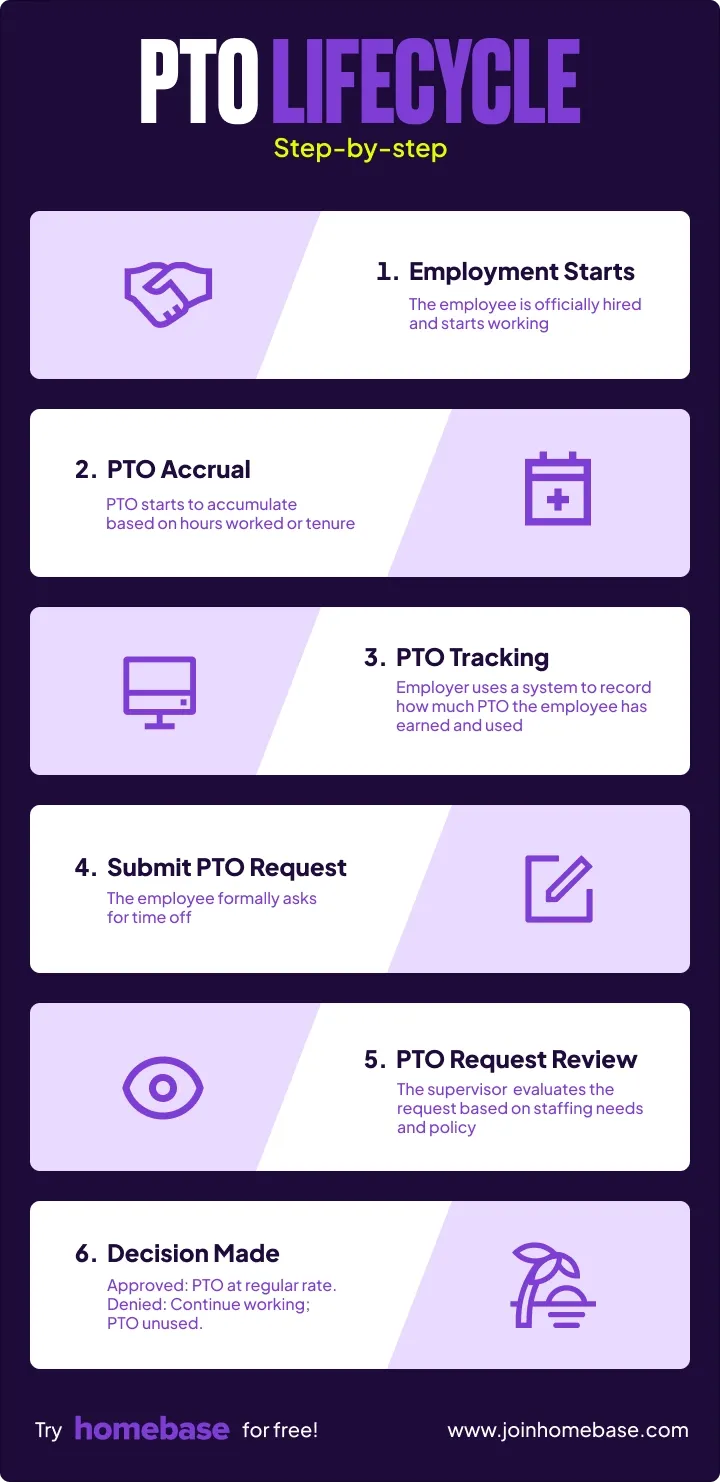
The approval process:
- Employee submits request with dates and total hours requested
- Manager reviews for coverage and scheduling conflicts
- Approval or discussion happens—if conflicts exist, discuss alternative dates
- Update schedules and records once approved
You can legally deny PTO requests for legitimate business reasons like staffing conflicts, insufficient notice (except emergencies), busy seasons, or when the employee hasn't earned enough PTO to cover the request.
Can PTO be used in partial-day increments? Yes—most businesses allow hourly increments for appointments or errands. If someone needs to leave two hours early for a dentist appointment, they should be able to use two hours of PTO without burning an entire day.
Does PTO Count Toward Overtime?
No. PTO hours do NOT count toward the 40-hour overtime threshold. Federal law requires overtime pay for hours worked over 40 in a week. Since PTO is time NOT worked, it doesn't trigger overtime.
Example: An employee works 32 hours Monday-Thursday, then takes 8 hours of PTO on Friday. They get paid for 40 hours total at regular rate, but no overtime is triggered because they only worked 32 hours.
Common PTO Mistakes to Avoid
Even well-intentioned businesses make PTO mistakes that create disputes, compliance violations, and employee resentment. These errors typically stem from informal policies, manual tracking systems, and inconsistent enforcement.
Avoiding these common pitfalls protects your business legally while building trust with your team.
Not Having a Written PTO Policy
Running PTO on handshake agreements creates disputes about earned PTO, inconsistent application, and compliance violations. Without written documentation, you have no protection when disputes arise and no way to prove you're applying rules fairly.
The fix: Create a written policy covering accrual rates, eligibility, rollover rules, approval process, and payout policies. Have every employee sign an acknowledgment that they've read and understood it.
Failing to Track PTO Accruals Accurately
Manual tracking using spreadsheets creates calculation errors, outdated balances, and no audit trail when disputes arise. One missed formula can ripple through months of calculations, and you'll never know until someone requests time off they haven't actually earned.
The fix: Use automated PTO tracking software that calculates PTO in real-time based on actual hours worked. When employees clock in and out, their PTO balance updates automatically—no manual entry, no formulas to break, no errors.
Inconsistent Application of PTO Rules
Playing favorites with approval decisions or enforcing blackout periods for some employees but not others creates morale and legal problems. Maybe you always approve your star server's requests but make your new hire jump through hoops.
The fix: Apply your policy consistently to everyone and document decisions so you can prove you're not discriminating.
Ignoring State and Local PTO Laws
State and local paid leave laws change constantly, and ignorance isn't a defense when violations can cost thousands in fines. If you're not tracking changes in minimum accrual rates, mandatory sick leave provisions, or payout requirements, you're setting yourself up for compliance violations.
The fix: Check requirements annually and exceed minimum requirements when possible. Being more generous than legally required gives you a buffer and positions you as an employer of choice.
How to Set a Fair PTO Policy for Your Hourly Team
A well-designed PTO policy balances employee needs with business operations while staying compliant with local laws. The best policies are clear, easy to understand, and consistently applied across your entire team. Creating a fair policy from the start prevents disputes and helps you compete for talent without breaking your budget.
Essential Elements of a PTO Policy
Every PTO policy should clearly define:
- Accrual method and rates: How employees earn PTO and the exact rate (e.g., "1 hour of PTO for every 40 hours worked")
- Eligibility requirements: Who qualifies and any waiting periods before PTO can be used
- Usage rules: Advance notice requirements, blackout periods during busy seasons, and whether partial-day PTO is allowed
- Rollover rules: Whether unused PTO carries over to the next year and caps on accumulation
- Approval process: Who approves requests, typical response time, and how you handle scheduling conflicts
- Payout policies: What happens to unused PTO when someone leaves—paid out, forfeited, or depends on circumstances
How to Document and Communicate Your Policy
Create a written policy document in clear, simple language. Avoid legalese—write like you're explaining it to a new neighbor. Include it in your employee handbook and make it easily accessible.
Review the policy during onboarding so new hires understand it before they start. Walk through examples: "Here's how you'll earn PTO, here's how to request time off, here's what happens if multiple people want the same days."
Get signed acknowledgments from every employee stating they've received, read, and understood the policy. This protects you if disputes arise later. Communicate changes immediately if you update the policy—don't assume employees will check for updates.
Consider your seasonal fluctuations, coverage requirements, budget constraints, and competitive positioning when designing your policy. The goal is creating something that's fair to employees while maintaining operational excellence.
Best Practices for Tracking and Managing PTO
How you track PTO directly impacts payroll accuracy, employee satisfaction, and compliance risk. Manual spreadsheet systems might work for a team of three, but they quickly become error-prone and time-consuming as you grow.
Modern digital tracking eliminates calculation mistakes, gives employees real-time visibility, and seamlessly connects to your payroll system.
Why Manual PTO Tracking Fails
Spreadsheet-based tracking creates calculation errors, outdated balances that don't reflect recent hours worked, massive time investment every pay period, no employee visibility, and no audit trails for disputes.
Calculating accruals for 15 employees with different schedules, pay rates, and start dates can take hours every pay period—time you could spend growing your business.
Kathleen Smith, founder of Smiling Tree Toys, experienced this firsthand:
"Before Homebase I was manually tallying up my team's work hours and entering them into payroll, crossing my fingers I hadn't made any mistakes. Now our entire team logs in and out quickly and easily with the Homebase app, and all I have to do is send their hours to my payroll program with the click of a button."
How Homebase Simplifies PTO for Hourly Teams
Digital PTO tracking provides real-time updates, automatic calculations, employee self-service, streamlined approvals, complete audit trails, and payroll integration.
Homebase makes PTO management effortless:
- Automatic accrual tracking updates with every shift as employees clock in and out
- Real-time team visibility lets employees check their balance anytime through the mobile app
- Built-in request and approval workflows let employees submit requests through the app—you get notifications, can approve with one tap, and approved requests automatically update the schedule
- Seamless scheduling integration means approved PTO appears on the schedule automatically
- Direct payroll connection ensures PTO hours flow into payroll without manual entry
Start giving your team the transparency they deserve. Homebase tracks PTO accruals automatically, lets employees request time off through the app, and flows approved requests directly into your schedule and payroll.
Frequently Asked Questions About PTO for Hourly Employees
How Do You Calculate PTO for Hourly Employees?
To calculate PTO for hourly employees, divide total hours worked by your accrual rate. For example: 520 hours worked ÷ 40 = 13 hours of PTO earned. To convert PTO hours to days, divide by typical shift length (usually 8 hours).
What Is a Typical PTO Accrual Rate?
A typical PTO accrual rate is 1 hour of PTO for every 40 hours worked, which equals about 52 hours or 6.5 days annually for full-time employees. More generous businesses offer 1 hour per 30 hours worked (about 69 hours or 8.6 days annually).
Do Part-Time Employees Qualify for PTO?
Yes, part-time employees qualify for PTO in many states, especially those with mandatory paid sick leave. Part-time workers earn PTO at the same rate as full-time employees but accrue less total PTO because they work fewer hours.
What Happens to Unused PTO When You Quit?
What happens to unused PTO when you quit depends on your state and company policy. States like California require payout as earned wages. Most other states allow "use-it-or-lose-it" policies where unused PTO is forfeited.
Does PTO Count Toward Overtime or Hours Worked?
No, PTO does not count toward overtime or hours worked. Federal law requires overtime pay for hours worked over 40 in a week. Since PTO is time NOT worked, it doesn't trigger the 40-hour overtime threshold.
Can Employees Take PTO in Their First 90 Days?
Whether employees can take PTO in their first 90 days depends on your policy's waiting period. Many businesses let employees accrue PTO from day one but can't use it until completing a 90-day probationary period.
How Many PTO Hours Equal a Day Off?
For 8-hour shifts, 8 PTO hours equal one full day off. This varies by shift length—6-hour shifts need 6 hours of PTO, while 10-hour shifts need 10 hours.
Is PTO the Same as Vacation Time?
No, PTO is not the same as vacation time. Traditional vacation policies cover only recreational time off, while PTO combines vacation, sick leave, and personal days into one flexible bank that employees can use for any reason.
Do You Get Paid Out for PTO?
Whether you get paid out for PTO depends on state law and company policy. California and Montana require payout as earned wages. Most states let employers choose—many implement "use-it-or-lose-it" policies where unused PTO is forfeited.