Best Mobile Timesheet Apps for Small Business in 2026


SMALL BUSINESS INTEL, IN YOUR INBOX
Table of contents
It usually hits on a Sunday night. You're staring at a paper time card, trying to figure out whether that smudged entry says 8:01 or 8:11, and whether it even matters because you're pretty sure two people clocked in at 3pm from the same tablet. By the time you've sorted it out, you've lost an hour and you're not confident the math is right.
Mobile timesheet apps replace that process entirely. A mobile timesheet app is software that lets hourly team members clock in and out from their phones, automatically tracking hours, breaks, and overtime without paper time cards. For shift-based teams (restaurants juggling split shifts, field crews clocking in from customer driveways, retail associates sharing a tablet at the register), these apps solve real problems that paper systems simply can't.
This guide covers the best mobile timesheet apps for small businesses with hourly teams: what each one does well, where it falls short, and how to pick the right fit without wasting a free trial.
Best Mobile Timesheet Apps at a Glance
The best timesheet app for your business depends on your team's situation. Here's the short version:
- Homebase: Best for hourly teams that need timesheets that flow directly into payroll
- QuickBooks Time: Best for businesses already using QuickBooks accounting
- Clockify: Best for basic time tracking at low or no cost
- My Hours: Best for small teams prioritizing ease of use and reporting
- Connecteam: Best for field service and deskless teams across job sites
- actiTIME: Best for project-based billing and client hour tracking
- Timely: Best for knowledge workers who resist manual clock-ins
The right pick depends on whether you need GPS for field crews, payroll integration, project billing, or a free plan that doesn't lock the features you actually use.
Why Trust Homebase? Why We Built This Guide
We're Homebase, and we make a scheduling, time tracking, payroll, and HR app built for small businesses with hourly teams. We have a stake in this topic, so we want to be upfront: Every app there was evaluated on its own merits. We never accept payment or backlinks for a product mention.
We built this guide because we work with more than 150,000 small businesses across restaurants, retail, healthcare, and home services. We see what breaks down in time tracking every day, and we know the questions small business owners are actually asking when they go looking for a new app.
How We Chose the Best Mobile Timesheet Apps
We evaluated mobile timesheet apps designed for small businesses with hourly and project-based teams. Our rankings are based on:
- Mobile clock-in experience on both iOS and Android: is it fast, reliable, and easy for a first-time user?
- GPS and location features: can field workers clock in from job sites, and can managers verify location?
- Free tier quality: what's actually included without paying, and where does the paywall hit?
- Payroll integration: does the app connect directly to QuickBooks, Gusto, or built-in payroll processing?
- Break and overtime configuration: can administrators set the overtime, break, and rounding rules their workforce requires?
- Buddy-punch deterrence controls: PINs, clock-in photos, or device restrictions
- G2 and Capterra ratings: verified against each app's live page at time of review
- Pricing transparency: per-user cost verified directly against each vendor's live pricing page
Pricing, free-tier limits, and ratings were verified against each vendor's own site on July 21, 2026. For our full evaluation framework, see our methodology.
The 6 Best Mobile Timesheet Apps for Small Business
Each app below serves a different type of business. A restaurant running split shifts needs different features than a plumbing company tracking field crews across ten job sites. The picks below were evaluated on their own merits, ranked by fit for small businesses with hourly or project-based teams.
1. Homebase

Best for: Small businesses that want GPS-verified clock-ins and clean timesheets that flow straight into payroll, without a separate time clock system.
Rating: G2 4.6 · Capterra 4.6
What it is: Homebase is the everything app for hourly teams, and its time clock tracks hours, breaks, and overtime from phones, tablets, computers, or a Clover POS. Every clock-in becomes a timesheet automatically, and approved hours flow into payroll without anyone re-entering a number.
Key features:
- Clock in and out from any device with a unique PIN, no shared hardware required
- Geofencing that flags a clock-in outside a set radius of the job site, starting on the Essentials plan
- Automatic overtime and late-clock-in alerts, plus auto clock-out and time rounding on the Plus plan
- Photo verification at clock-in, so you know who's actually punching the clock
- Labor cost tracking by hour, department, and role, so you can see where hours are going before payday, not after
Free trial? Yes, 14-day free trial of the All-in-One plan.
Free plan? Yes, Homebase has a free Basic plan for one location and up to 10 employees.
Pricing: Paid plans start at $24 per location per month billed annually. Pricing is per location rather than per employee, so paid plans cover unlimited team members.
What users say: "Homebase takes a picture of the employee when they clock in. Having something there that I could rely on, something that's reliable that I can depend on and trust. I could track employees even when I'm not always at the store." — Primo Stropoli, owner, Tetta's Market. Read the case study.
2. QuickBooks Time
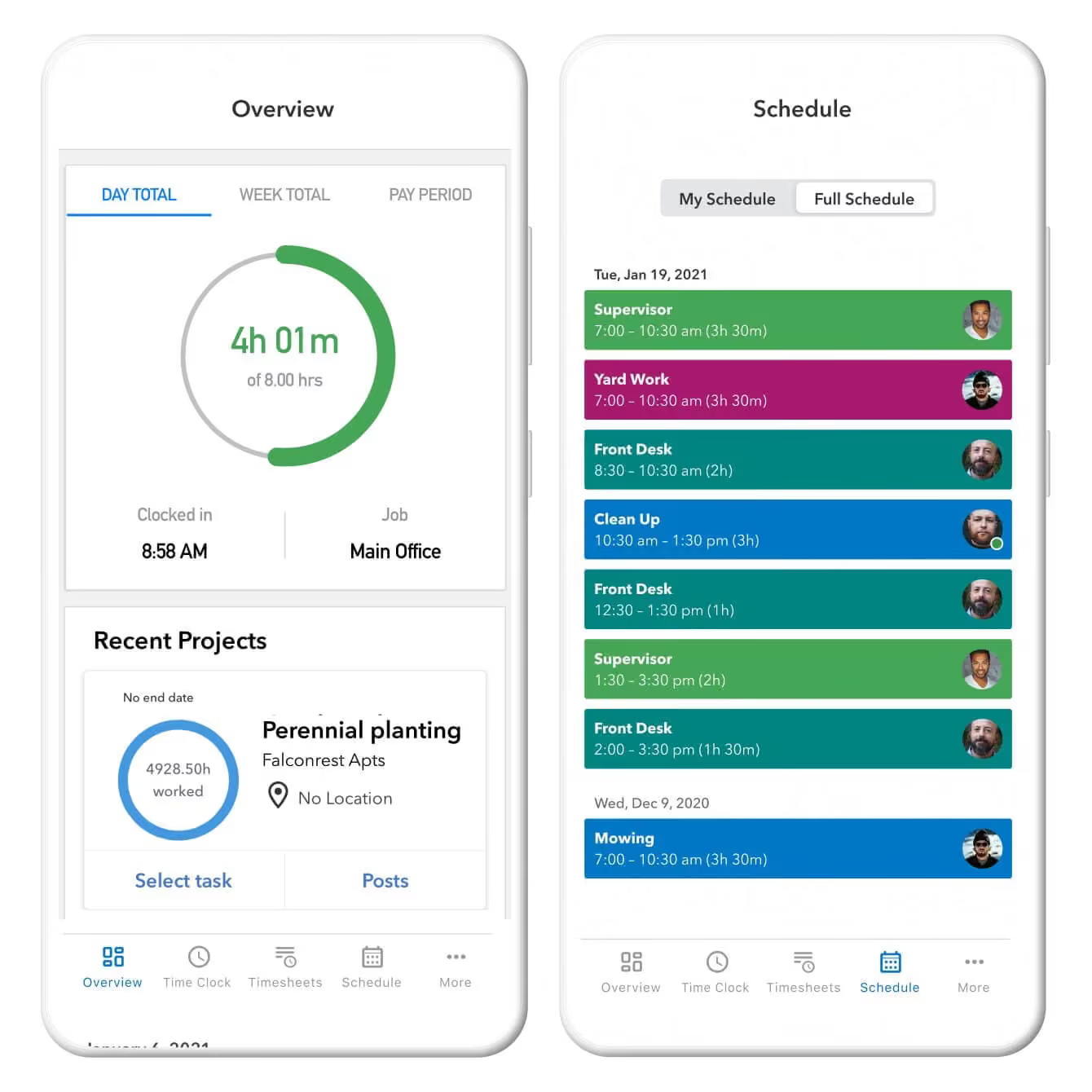
QuickBooks Time, formerly called TSheets, is a mobile time tracking app that integrates directly with QuickBooks accounting software. It requires an active QuickBooks Online subscription. It tracks hours by job, project, or customer, making it useful for service businesses that need to allocate labor costs across multiple clients or job types.
Best for: Businesses already using QuickBooks for accounting and payroll
Rating: G2: 4.5/5 (1,447 reviews, July 2026). Capterra: verify on live page.
Key features:
- GPS tracking and geofence-based clock-in/out reminders
- Time tracking by job, project, or customer
- Workers can attach photos to timesheets
- Basic scheduling module
- Direct QuickBooks Payroll sync (requires QuickBooks Online)
Pricing: Time Premium starts at $20/month base plus $10/user/month. Time Elite starts at $40/month base plus $12/user/month. Promotional discounts may appear; see the vendor's pricing page for current rates. No permanent free tier for teams.
What users like: Reviewers praise QuickBooks Time's straightforward timekeeping and its connection to QuickBooks accounting. One small-business office manager called it "pretty user friendly" and said replacing paper timesheets made payroll easier. (G2, April 2026.)
What users criticize: Recent reviewers mention occasional app glitches, limited customization for forgotten clock-outs, and complications with more specialized PTO workflows. One reviewer said: "Sometimes it glitches and you have to reset everything and start over." (G2, April 2026.)
What people are saying: Discussions in r/Architects compare QuickBooks Time with Clockify, Toggl, and other tools. Buyers outside the QuickBooks ecosystem frequently suggest lower-cost standalone trackers. Some users report mobile-sync, GPS, and reporting frustrations, though the thread is too small to treat as a broad consensus.
Our take: If QuickBooks is already your accounting system, the direct integration removes a real pain point: hours flow to payroll without CSV exports or manual entry. Keep in mind you'll need an active QuickBooks Online plan for this to work, which adds to the total cost. If you're not already in that ecosystem, the base fee plus per-user charge adds up quickly for small teams, and the interface requires more onboarding than most alternatives on this list.
3. Clockify

Clockify is a time tracking app with a free base tier and paid plans that add GPS location tracking, scheduling, and reporting features. It supports timer-based or manual timesheet entry. Workers can clock in from a phone, tablet, or browser, and the mobile app supports offline time capture when cell coverage is unreliable.
Best for: Teams that need basic time tracking at low or no cost
Key features:
- Free base plan (user limit subject to change; check Clockify's pricing page for current limits)
- GPS location tracking on Pro and Enterprise plans (not included in free, Basic, or Standard tiers)
- Offline time capture on iOS and Android
- Payroll data export; no built-in payroll processing
- Approval workflows and scheduling on paid tiers
Pricing: Free plan available; paid plans start at $3.99/seat/month with annual billing. See Clockify's pricing page for current limits. Note: July 2026 user reports indicate that some free-plan features, including billable-time, export, and historical-reporting capabilities, were recently moved to paid tiers.
What users like: Clockify users often highlight its simple timer, clear timesheets, clean interface, and approachable reporting. One reviewer said the timer was "simple to use" and the timesheets were "clear and easy to follow." Another said the interface was "very intuitive and clean." (G2 and Capterra, current.)
What users criticize: Limitations become more noticeable for teams that need advanced reports or complex administration. Reviewers mention restricted filters, additional steps when correcting time entries, and limited mobile personalization. One G2 reviewer said: "Some reporting and filtering can feel limited when you start needing more advanced breakdowns." (Current.)
What people are saying: A July 2026 thread in r/clockify shows frustration among some long-time free-plan users after Clockify moved billable-time, historical-reporting, and certain export capabilities behind paid tiers. Multiple commenters said the changes disrupted invoicing workflows. A Clockify representative responded saying an in-app notice had been shown to administrators and owners before the change, and that the free plan had been unusually broad for nearly a decade.
Our take: Clockify offers a real free starting point for basic hour logging, and its paid tiers add meaningful GPS and reporting features at a relatively low per-seat cost. The key caveat: GPS is not included in the free plan, and the free tier's current limits should be confirmed given recent changes. For a freelancer logging hours against projects, it works. For a restaurant or retail crew that needs scheduling and payroll in the same tool, you'll need a paid plan or a different app.
4. My Hours
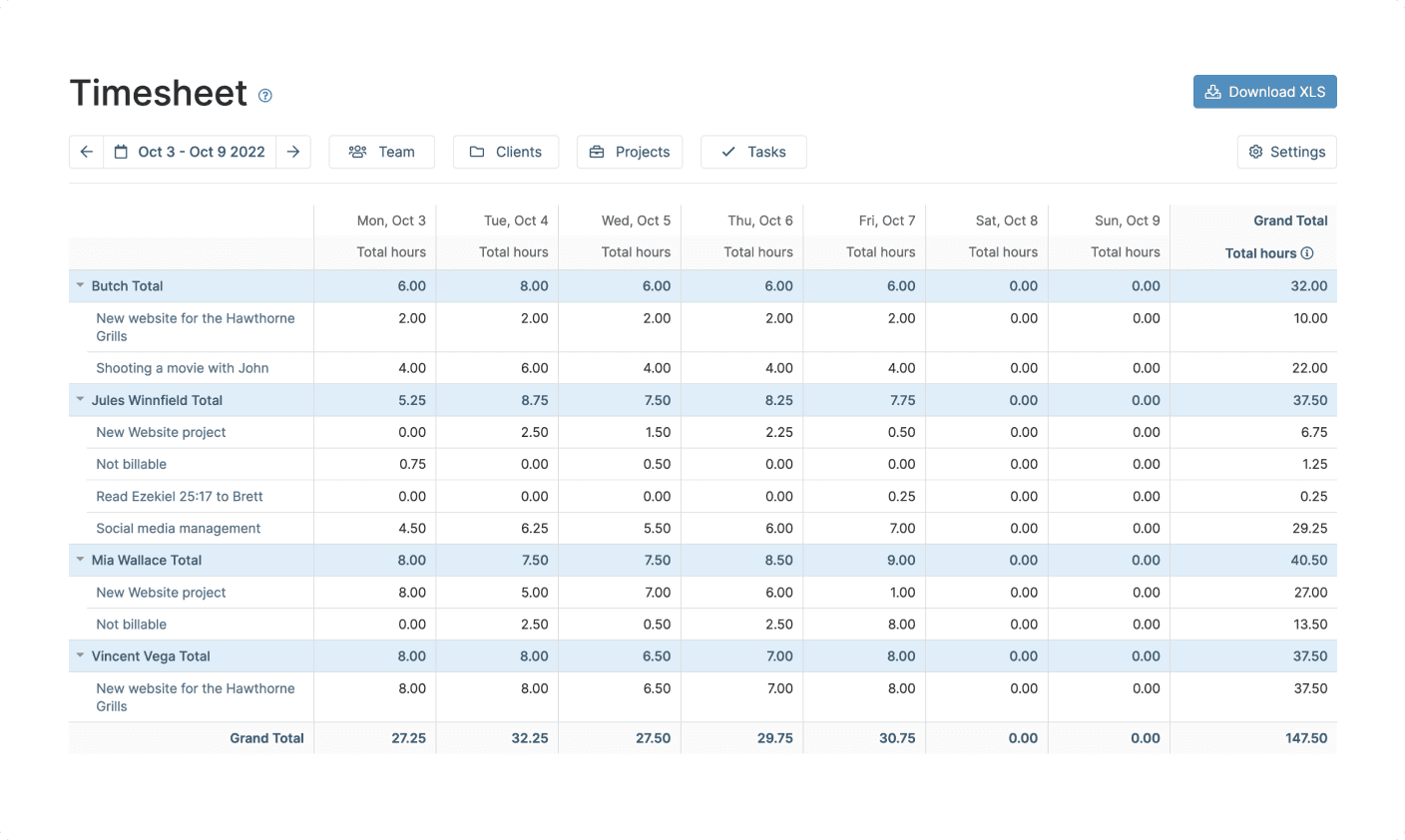
My Hours is a time tracking app focused on simplicity and project-based billing. It supports real-time timer tracking or manual timesheet entry, with detailed reporting on billable hours, project profitability, and team activity. The mobile app works on iOS and Android; a desktop app and browser extension are also available.
Best for: Small teams prioritizing ease of use, project billing, and responsive support
Rating: G2: 4.6/5 (267 reviews, July 2026). Capterra.
Key features:
- Real-time timer or manual timesheet entry
- Unlimited projects, tasks, and clients on the free plan
- Billable hour tracking with rates that vary by plan
- Timesheet review and approval
- Detailed reporting with profitability and budget views
Pricing: Free for up to 5 active users. Basic: $5/user/month (or $4/user/month with annual billing). Pro: $9/user/month (or $8/user/month with annual billing). See My Hours' pricing page for current rates.
What users like: My Hours reviewers praise straightforward timesheet entry, project and task organization, staff approvals, and responsive support. One March 2026 G2 reviewer said: "It allows me to easily input hours, track projects and tasks, and review and approve my staff's timesheets." Another said: "Every time I've asked for help, they've responded quickly and efficiently."
What users criticize: The most relevant limitations are mobile task visibility and occasional integration problems. One G2 reviewer said: "I'd like to see an improved view from the mobile app" for monitoring employees' daily tasks. Another noted that a Teams integration stopped working intermittently.
Our take: My Hours earns its reputation for ease of use: setup is fast, the interface is clear, and the support team is consistently praised. It does not provide built-in payroll processing and is primarily designed for project time and billing workflows. For a 4-person consulting firm tracking client hours, it's hard to beat at the price. For a restaurant or retail crew punching in for shifts, it doesn't have the GPS, scheduling, or payroll tools you need.
5. Connecteam
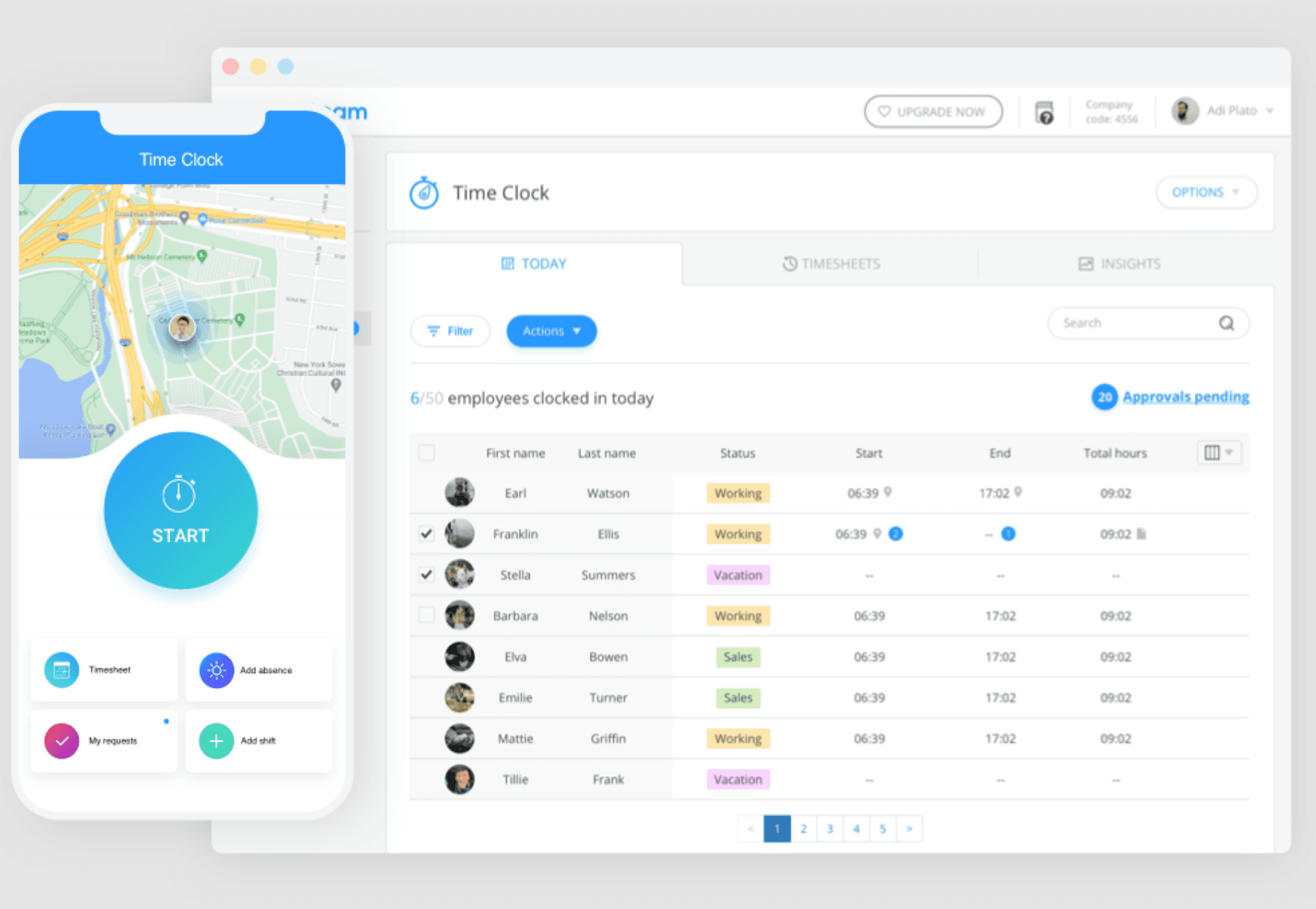
Connecteam is a mobile-first operations app built for deskless teams. It combines GPS time tracking with job scheduling, team messaging, task checklists, and field-team communication, designed for workers who move between locations throughout the day and rarely sit at a desk.
Best for: Field service and deskless teams spread across job sites
Rating: G2: 4.6/5 (3,501 reviews, July 2026), the highest review volume of any app on this list for the small-business segment. Capterra.
Key features:
- GPS clock-in with geofencing per job site
- Job scheduling and dispatching in the same app
- Team messaging and company announcements
- Task checklists for field workers
- Free Small Business plan for teams of 10 or fewer
Pricing: Free for up to 10 users (Small Business plan). Paid Operations plans start at $29/month for the first 30 users with annual billing; month-to-month pricing is higher. See Connecteam's pricing page for current rates.
What users like: Reviewers value having scheduling, time tracking, communications, and field-team workflows in one mobile system. One January 2026 G2 reviewer said: "Scheduling, time tracking, and communication are all in one place." A small-business owner praised how easy it was to see employee availability and manage open shifts.
What users criticize: Connecteam's breadth can make the interface feel crowded when multiple modules are active. Reviewers note limited advanced reporting, integration complexity, and setup time. One G2 reviewer said the app "can also feel slightly cluttered when you're using many tools at once." A smaller number of field-team users report connectivity or GPS problems under weak signal conditions. (January 2026.)
What people are saying: A r/smallbusiness thread raised the question of whether Connecteam's free plan is too good to be true. The discussion reflects the same tradeoff seen in G2 reviews: the plan breadth attracts buyers, while some teams find the interface frustrating after enabling several modules. The available independent Reddit sample is limited, so treat this as anecdotal rather than a broad consensus.
Our take: Connecteam is a strong fit for landscaping crews, cleaning companies, and construction teams where workers move between sites throughout the day. It includes payroll integrations on paid plans (not just exports), though compatibility depends on your payroll provider, so confirm that before committing. The free 10-user plan is real and includes meaningful field-team features. Beyond 10 users, you'll move to a paid plan starting at $29/month with annual billing.
6. actiTIME

actiTIME is a project-based time tracking app that logs hours against specific clients, projects, and tasks. It separates billable from non-billable hours and tracks project budgets in real time.
Best for: Consulting firms and agencies billing clients by the hour
Rating: G2: 4.6/5 (48 reviews, July 2026). Capterra.
Key features:
- Billable vs. non-billable hour tracking
- Project budget monitoring with visual progress
- Timesheet approval and lock workflow
- QuickBooks integration
- Free for up to 3 users with limited functionality
Pricing: Free for up to 3 users with a limited feature set. Annual paid pricing: approximately $6/user/month for 1–40 users; $5/user/month for 41–200 users. See actiTIME's pricing page for current rates and free-plan details.
What users like: actiTIME reviewers value estimated-versus-actual time comparisons, project-cost visibility, and timesheet approvals. One G2 reviewer said: "The ability to compare estimated and actual time is extremely valuable." Another said: "Entering time takes seconds." Both connected these features to evaluating project performance and improving future estimates.
What users criticize: Available G2 reviewers ask for more integrations with CRM and marketing tools, better approval notifications, and richer report visualizations. Because the G2 profile has fewer than 50 reviews, these reflect observed requests rather than a broad consensus.
Our take: actiTIME is purpose-built for project billing, not shift-based hourly tracking. If your team clocks in for a shift rather than against a client project, it adds complexity without payoff. The approval and lock workflow is a real asset for agencies that submit client timesheets. The free 3-user plan has a limited feature set, so confirm whether the billing and approval tools you need are included before relying on it.
7. Timely

Timely is an AI-powered time tracking app that records work activity automatically in the background. Workers don't clock in manually. Instead, the app captures a private timeline of activity throughout the day, and workers review and approve entries before submitting. The app learns patterns over time to improve auto-fill accuracy.
Best for: Knowledge workers and creative teams who resist manual time tracking
Rating: See G2 and Capterra for reviews. Note: confirm the correct product profile refers to Timely by Memory (timely.com), as results may include similarly named software.
Key features:
- Automatic background time tracking (no manual clock-ins required)
- AI-assisted timesheet completion
- Task planning view
- Private timeline (activity is not shared with managers by default)
- Available on web, iOS, Android, Mac, and Windows
Pricing: See Timely's pricing page for current rates.
What users like: A recurring theme in reviews is "focus on work first, time capture second": the automatic capture removes the pressure of remembering to start a timer.
What users criticize: Some reviewers note that categorizing captured activity can be time-consuming, particularly in the review-and-approve step at the end of the day.
Our take: Timely's automatic tracking removes the friction of remembering to start a timer, which is its clearest differentiator. It doesn't solve anything for restaurant or retail teams. Hourly workers need a clock, not a passive tracker. The pricing is higher than most alternatives on this list; verify the current figures and confirm device availability before finalizing the entry.
Frequently Asked Questions About Mobile Timesheet Apps
What Is the Best Timesheet App for Small Businesses?
The best timesheet app for most small businesses with hourly teams is one that combines clock-in, scheduling, and payroll in a single app. Homebase, QuickBooks Time, and Clockify are the most common picks, and each fits a different situation depending on whether you need direct payroll integration, GPS field tracking, or a low-cost option for basic hour logging.
What Is a Mobile Timesheet App?
A mobile timesheet app is software that lets employees clock in and out from their phones instead of paper time cards or a physical punch clock. Depending on the product and plan, the app may also calculate overtime and break rules you've configured, and export recorded hours for payroll processing.
Are Mobile Timesheet Apps Good for Small Businesses?
Yes, particularly for businesses with hourly teams. Mobile timesheet apps can reduce manual transcription and arithmetic errors, though incorrect settings or missed punches can still create problems. They also give managers visibility into who is working and what overtime is accumulating before payroll runs, not after.
What Features Should I Look for in a Timesheet App?
Prioritize GPS location features if you manage field workers, buddy-punch deterrence controls (PINs, clock-in photos, or device restrictions), configurable overtime and break rules, and direct payroll integration with QuickBooks or Gusto. Everything else (scheduling, team messaging, PTO tracking) is valuable, but secondary to solving your biggest pain point first.
Can Mobile Timesheet Apps Help With Labor Law Compliance?
Timekeeping apps can support recordkeeping and rule administration, but they don't determine which federal, state, or local requirements apply to your business. They preserve records of hours worked, breaks, and overtime: the kind of documentation the Department of Labor's Wage and Hour Division may request during an investigation. Consult an employment attorney for guidance specific to your situation.
How Does GPS Tracking Work in Timesheet Apps?
GPS tracking captures an employee's location when they clock in or out using their phone. Geofencing behavior varies by product: some systems restrict clock-ins to a defined boundary, while others record location or send reminders when an employee is outside the boundary. Confirm how a specific app handles this before relying on it for enforcement.
Is Clockify's Free Plan Still Enough for a Small Business?
Clockify's free plan covers basic time capture and is a real starting point, but its current limits should be checked carefully. A July 2026 Reddit thread includes multiple users reporting that recent changes removed or restricted billable-time, historical-reporting, and export workflows. Verify the exact current free-plan entitlements on Clockify's pricing page before relying on them.
Is Connecteam's Small-Business Plan Too Good to Be True?
The free Small Business plan is real and supports up to 10 users, but teams should test the specific workflows they intend to use before committing. Reviews praise the breadth of features in one system, while some users find the interface crowded when multiple modules are active. Test during a trial and confirm payroll-provider compatibility before switching.
The Right App Comes Down to One Question
Not every mobile timesheet app is built for the same kind of team. Most of the apps on this list (Clockify, actiTIME, My Hours, Timely) are designed around project time, client billing, and knowledge workers who track hours against deliverables. They're strong tools for those use cases. But if your team clocks in for shifts, works across job sites, or needs scheduling and payroll to talk to each other, they're not built for your situation.
QuickBooks Time and Connecteam get closer. QuickBooks Time earns its place if you're already inside the QuickBooks ecosystem and need job costing. Connecteam is a strong fit for field teams moving between sites.
For hourly teams in restaurants, retail, healthcare, and home services, where scheduling, time tracking, and payroll need to work together, Homebase was built for that specifically. The free plan covers one location and up to 10 employees, with basic scheduling and time tracking included. Paid plans start at $30/location/month if you need GPS clock-in or advanced messaging; payroll is an add-on ($49/month + $6 per employee paid).
Start with the app that matches your biggest friction point. If it's payroll errors, focus on integration. If it's field accountability, focus on GPS. If it's just tracking hours for a freelance crew, a free plan gets you most of the way there.
