Top 5 Free Payroll Apps for Small Business (2026)


SMALL BUSINESS INTEL, IN YOUR INBOX
Table of contents
Looking for the top five free payroll apps? If you've got a small team to pay, you don't want to spend a fortune doing it. “Free" might sound like exactly the right price.
But free payroll software for small business rarely works the way the name implies. Most free payroll apps calculate your taxes without filing them. Direct deposit? Usually a paid add-on. Compliance support? Mostly on you.
This guide is an honest look at the top five free payroll apps: what each one actually gives you, where it draws the line, and when it's time to move on.
Best free payroll apps at a glance
The best free payroll apps for small business right now are Homebase, Payroll4Free, ExcelPayroll, eSmart Paycheck, Wave Payroll, and Gusto, each one a fit for a different stage and situation.
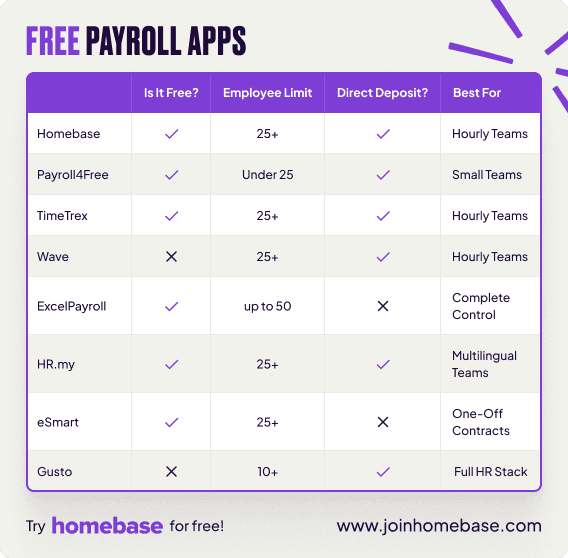
Compare the top 5 free payroll apps for small businesses: see which offers tax filing, direct deposit, employee limits, and best-fit scenarios.
- Payroll4Free: Best genuinely free option for teams of up to 9. No monthly fee, no expiration. Windows only, manual entry required.
- ExcelPayroll: Best for owners who want full data control in a spreadsheet. Free download, up to 50 employees, no cloud access.
- eSmart Paycheck: Best simple paycheck calculator. Permanently free, no saved data, one-off use only.
- Wave Payroll: Best affordable paid option for teams outgrowing free. $40/month + $6/employee, 30-day free trial.
- Gusto: Best for growing teams ready to invest in full HR. $49/month + $6/employee, no charge until first payroll.

Homebase makes payroll painless.
Onboard employees, track their time, and pay them — all in one place.
Why Homebase created this list
We work with 100,000+ small businesses every day, and we see the whole picture, including what happens when a team picks a tool that's one size too small. If a free payroll app is the right fit for you right now, we'd genuinely rather you use it than rush into a paid upgrade you're not ready for.
When your team grows past what free tools handle well, there's a clear next step. When you're ready for payroll, our’s connects straight to your time clock with no re-entry and no payday scramble.
What to look for in a free payroll app for small business
Not all free tiers are built the same. Before you pick free payroll for small business, here's what's worth checking. As one small business owner put it on Reddit: the big thing is making sure the system handles tax filings automatically so you don't end up stressing about deadlines later. That's the crux of it.
- Employee limits. Most free plans cap you somewhere between 10 and 25 employees. Know where that wall is before you hit it.
- Tax calculations vs. tax filing. Calculating taxes is standard on free tiers. Actually filing your quarterly returns and year-end forms? That almost always costs extra. As per the IRS (Publication 15), late deposits trigger penalties starting at 2% and climbing to 15%.
- Direct deposit. Often a paid add-on. Read the fine print before you assume it's included.
- Mobile access. If your team lives on their phones, a desktop-only payroll tool is going to frustrate everyone. Look for a real mobile payroll app with iOS and Android support.
- Employee self-service. Can your team members pull up their own pay stubs and tax forms, or does every request come to you?
- Time tracking integration. The cleanest setups sync hours straight from a time clock to payroll. Separate tools mean manually re-entering data every pay period, and that's where errors creep in.
- Automation vs. manual entry. Can payroll run itself once it's set up, or are you entering numbers by hand every time? Manual is fine for one or two people; it gets risky fast at eight.
- Compliance support. Does the app automatically handle overtime rules, break requirements, and local tax rates? As per the Department of Labor, your hourly team members must receive overtime pay for hours over 40 in a workweek, and getting that wrong has consequences.
- All-in-one vs. disconnected tools. Every handoff between separate scheduling, time tracking, and payroll apps is a chance for data to get lost or entered twice.
The best free payroll apps for small business in 2026
Not every app on this list is free in the same way. Payroll4Free and ExcelPayroll are genuinely free with no clock ticking. eSmart Paycheck is free as a one-off calculator. Wave and Gusto have free trial windows before your card gets charged.
If you've been searching for the top five free payroll apps and wondering which one actually fits your situation, here's the honest breakdown.
1. Payroll4Free: best genuinely free option for teams of up to 9
If your team is nine people or fewer and you're on Windows, Payroll4Free is as close to truly free payroll software as you're going to find. There's no monthly fee, no trial countdown, no expiration.
It handles tax calculations, generates your printable tax forms, and gives your team members a self-service portal for pay stubs and benefits info. Run direct deposit through your own bank and that's free too.
The tradeoffs are real and worth knowing upfront: Windows desktop only, no Mac, no mobile app, and no connections to scheduling or time tracking. You enter hours by hand every pay period. And if you want Payroll4Free to handle your tax filing for you, that's the Payroll Tax Service add-on at $12.50/month.
Pros:
- Genuinely free for up to 9 employees, no time limit, no credit card required
- Direct deposit free when using your own bank
- Federal, state, and local tax calculations built in
- Employee self-service portal for pay stubs and tax forms
- PTO, vacation, and sick time tracking included
Cons:
- Free tier capped at 9 employees
- Windows desktop only, no Mac, no mobile app
- Tax filing is a $12.50/month add-on
- No time tracking integration or scheduling
- Manual hour entry every pay period
Pricing: Free for up to 9 employees. Payroll Tax Service: $12.50/month. Direct deposit via Payroll4Free's bank: $12.50/month.
What users say: Capterra users rate Payroll4Free 3.2/5 stars based on 12 reviews. The consistent theme: it does the basics, but the interface is dated and there's a learning curve.
Bottom line: If you need a free payroll app with direct deposit and your own bank can handle the transfers, Payroll4Free delivers. Just know what you're signing up for: manual entry, Windows only, and tax filing is extra.
2. ExcelPayroll: best for owners who live in spreadsheets
ExcelPayroll is a free downloadable template, not a payroll app in the traditional sense, but a fully built-out Excel workbook designed to do payroll for you. Download it once, own it forever. It generates W-2, W-3, 940, and 941 forms, handles overtime and PTO, and prints pay stubs and checks right from your spreadsheet.
If you're the kind of owner who trusts a spreadsheet over a cloud tool and wants complete visibility into every number, it gives you exactly that at zero cost.
If that doesn't describe you, the risk picture changes quickly. There are no guardrails here: no compliance alerts, no automation, no error checking. The more complex your payroll gets, the more room there is for things to go sideways.
Pros:
- Completely free, one-time download
- Up to 50 employees
- Generates W-2, W-3, 940, and 941 forms
- Works offline, no cloud login required
- Generates bookkeeping journal entries alongside payroll
Cons:
- No automation, every calculation is manual
- No direct deposit or employee self-service portal
- No compliance alerts or safeguards
- Error risk grows fast with team size or pay complexity
- A spreadsheet template, not a payroll system
Pricing: Free. Requires a licensed copy of Microsoft Excel.
Bottom line: ExcelPayroll is a solid pick if you're genuinely comfortable in spreadsheets and want zero-cost control. For everyone else, the compliance gaps tend to outweigh the savings once your team starts to grow.
3. eSmart Paycheck: best simple paycheck calculator
eSmart Paycheck isn't really a payroll app. It's a paycheck calculator that's free to use, requires no account, and saves nothing between sessions. Enter hours and a pay rate, get gross pay, withholdings, and net pay for federal, state, and local taxes. Print the stub. Done. Every time you come back, you start from scratch.
For a one-off contractor payment, a seasonal hire, or a situation where you just need to know what someone's check should be, it does exactly that without any friction. If you're running payroll for a regular team on a recurring schedule, this isn't the right tool.
Pros:
- Permanently free, no account or login needed
- Calculates federal, state, and local taxes, including overtime and bonuses
- Printable pay stubs with no setup
Cons:
- No saved data between sessions, fresh start every time
- No direct deposit, no tax filing, no record-keeping
- A calculator, not a payroll system
- No employee portal or self-service
Pricing: Permanently free. A paid version exists for businesses that need data storage and recurring payroll.
Bottom line: eSmart Paycheck earns its spot on this list for one-off use. If you're running payroll for a team more than once a quarter, you'll outgrow it fast.
4. Wave Payroll: best affordable paid option for teams outgrowing free
Wave isn't free, but it gives you a 30-day trial before charging. Once billing starts, it's $40/month plus $6 per active employee per month. If you're already using Wave for accounting, adding payroll is seamless. Tax filing, direct deposit, W-2s, and 1099s are all included. For a five-person team, you're looking at $70/month for a complete payroll setup.
The part that matters for hourly teams: Wave has no scheduling, no time clock, and no labor compliance tools. If you need those alongside payroll, and most hourly businesses need those, you'll end up managing multiple apps and entering data between them.
Pros:
- 30-day free trial before your first charge
- Full-service payroll with automatic tax filing
- Direct deposit included
- Integrates with Wave's free accounting tools
- W-2s and 1099s at year-end included
Cons:
- Not free after trial: $40/month + $6/active employee from day 31
- No scheduling, time clock, or labor compliance tools
- Not built for hourly or shift-based teams
- Adding separate time tracking means re-entering data between systems
Pricing: $40/month + $6/month per active employee. 30-day free trial.
What users say: Capterra rates Wave (across all products) 4.4/5 stars based on 1,720+ reviews. Wave Payroll specifically draws more mixed feedback, with users frequently citing slow customer support. G2 rates Wave Payroll 4.1/5 stars based on 31 reviews.
Bottom line: Wave is a strong pick if you're already living in their accounting ecosystem. For hourly teams that also need scheduling and compliance tools, plan on adding more apps alongside it.
5. Gusto: best for growing teams ready to invest in a full HR stack
Gusto won't charge you anything until you actually run payroll, so you can set everything up, explore the system, and see how it fits before money changes hands. When you do run your first payroll, you're on the Simple plan at $49/month plus $6 per employee per month. That covers automatic tax filing in all 50 states, direct deposit, new hire onboarding, e-signatures, and benefits administration.
The honest tradeoff: costs climb noticeably as your team grows, and Gusto is designed broadly for HR rather than specifically for hourly operations. There's no native scheduling or time clock. Gusto does integrate with Homebase for time tracking, which is how many hourly teams make it work. See exactly how the two compare on our Homebase vs. Gusto page.
Pros:
- No charge until your first payroll run
- Automatic tax filing in all 50 states
- Benefits administration, onboarding, and e-signatures included
- Widely cited as easy to set up
Cons:
- Not free: $49/month + $6/employee/month once payroll runs
- Costs grow significantly with headcount
- Not built specifically for hourly or shift-based teams
- Mixed reviews at scale, with some users reporting service friction with complex payroll
- No native scheduling or time clock
Pricing: $49/month + $6/month per employee. No charge until first payroll.
What users say: Capterra rates Gusto 4.6/5 stars based on 4,191 reviews. G2 rates Gusto 4.5/5 stars. Both reflect strong satisfaction with core payroll and onboarding. Trustpilot scores are significantly lower, driven by support complaints when tax filing issues arise.
Bottom line: Gusto is a great fit for businesses that need a full HR stack. If your team is primarily hourly and you want scheduling, time tracking, and payroll in one connected app, Homebase is built more specifically for that.
When free payroll isn't enough
Free payroll apps earn their place. But every one of them has a ceiling, and it usually shows up before you expect it. Here's what to watch for.
- Manual entry is eating your time. Spending an hour or more on data entry every pay period means the tool is costing more than it saves.
- Filing deadlines are keeping you up at night. As per the IRS, late payroll tax deposits carry penalties starting at 2% and climbing to 15% for deposits more than 10 days overdue. That's an expensive lesson.
- Your team is bumping the employee cap. Payroll4Free stops at 9. Most other free tiers cut off around 10 to 25.
- Direct deposit is stuck behind a paywall. Printing and handing out checks creates friction for everyone on the team.
- You're doing overtime and tips by hand. As per the Department of Labor, your hourly team members must receive overtime pay for hours over 40 in a workweek, and that math has to be right every time.
When those warning signs show up, it's usually time to switch to a payroll provider that handles the complexity for you. Homebase payroll calculates overtime, handles tip distribution, and files your taxes automatically.
Which free payroll app is right for your team?
Here's what you need to look out for when deciding on which payroll app is the right fit:
- Under 9 employees, Windows user, happy entering hours manually: Payroll4Free is the best free payroll app with no time limit for very small teams.
- Want full data control in a spreadsheet: ExcelPayroll. Complete control, just watch for compliance gaps as your team grows.
- Just need to calculate one paycheck: eSmart Paycheck. A calculator, not a system, but exactly right for one-off use.
- Ready to pay for payroll and already using Wave accounting: Wave Payroll. $40/month + $6/employee, with a 30-day free trial.
- Need the best payroll app for a full HR stack: Gusto. $49/month + $6/employee, no charge until your first payroll.
Pay your hourly team right with Homebase
Most free payroll tools give you a calculator. Homebase is the small business payroll app built for how hourly teams actually work: from clock-in to paycheck, everything in one place.
- Your team clocks in on their phones, and hours sync to timesheets automatically
- Timesheets convert to payroll with pre-filled hours, no re-entry
- Automatic tax filing, direct deposit, and year-end W-2s and 1099s included
- Overtime, break compliance, and tip distribution handled automatically
- Scheduling and time tracking are free on the Basic plan for teams of up to 10
“I'm not concerned about payroll problems anymore. I don't have that stress on my mind. I can play with my dog more. That's super simple, but super positive, and it's worth a lot to me.” — Bradley Cooke, Executive Director of Forebay Aquatic Center
Start free with scheduling and time tracking. Add payroll when your team is ready, and never re-enter hours again.
Free payroll app FAQs
What payroll apps are free?
The top five free payroll apps for small business include Payroll4Free (free for up to 9 employees, no expiration), ExcelPayroll (a downloadable spreadsheet template for up to 50 employees), and eSmart Paycheck (a free one-off calculator).
Most free payroll apps calculate your taxes but don't file them. As per the IRS, Form 941 quarterly filings are required no matter which payroll app for small business you use, so check whether yours handles that or leaves it to you.
Is Payroll4Free actually free?
Payroll4Free is free for up to 9 employees with no expiration and no credit card required. Direct deposit is free when you run it through your own bank; using Payroll4Free's bank costs $12.50/month. Automatic tax filing runs $12.50/month as an add-on. The app is Windows desktop only with no mobile access.
Can ChatGPT do payroll?
ChatGPT can't process payroll, calculate withholdings, file tax forms, or issue direct deposits. It's a language tool, not a payroll system. It can help you understand payroll concepts or draft a policy, but you need a dedicated payroll app to pay your team correctly and stay compliant.
What free payroll apps work on Android?
None of the five apps on this list offer a full Android payroll experience on the free tier. Payroll4Free is Windows desktop only, while ExcelPayroll and eSmart Paycheck are browser or download-based tools.
For hourly teams, Homebase offers a free mobile time clock on both Android and iOS. Your team clocks in and you track hours from the same app, even on the free Basic plan.
What's better than ADP for small business?
For very small businesses, ADP can feel expensive and more complicated than it needs to be. Small business owners on Reddit raise this concern regularly. Gusto ($49/month + $6/employee) and Wave ($40/month + $6/employee) are simpler, more transparent options for growing teams.
For hourly businesses that also need scheduling and time tracking, Homebase connects all three in one payroll app for small business.
Homebase makes payroll painless.
Onboard employees, track their time, and pay them — all in one place.