Best Time Clock Software for Small Business in 2026


SMALL BUSINESS INTEL, IN YOUR INBOX
Table of contents
It's Friday afternoon. Payroll is due Monday. You've got three missed punches to sort out, a group text thread standing in for a schedule, and a spreadsheet that may or may not reflect what your team actually worked this week. The problem isn't you. It's the tools.
The best time clock software for small business tracks hours accurately, prevents time theft, and sends clean timesheets to payroll without manual cleanup. This guide covers everything: what time clock software does, how to choose the right type for your business, and the top-rated picks for 2026.
What's the Best Time Clock Software for Small Businesses?
The best time clock software for most small businesses tracks clock-ins accurately, prevents time theft, and sends clean hours to payroll without manual cleanup. For hourly teams in restaurants, retail, or salons, Buddy Punch and Connecteam are well-regarded all-around picks. QuickBooks Time is a strong fit if you're already in the QuickBooks ecosystem. Clockify is the leading free option for very small teams.
- Buddy Punch: Strong all-around pick, with multiple clock-in verification methods and broad payroll integrations
- QuickBooks Time: Built for QuickBooks users who want native payroll integration
- Deputy: Well-suited for multi-location teams with complex scheduling needs
- Clockify: Free time clock software for teams of up to five users
- Connecteam: All-in-one app for deskless and field teams

Why Trust Homebase? Why We Built This Guide
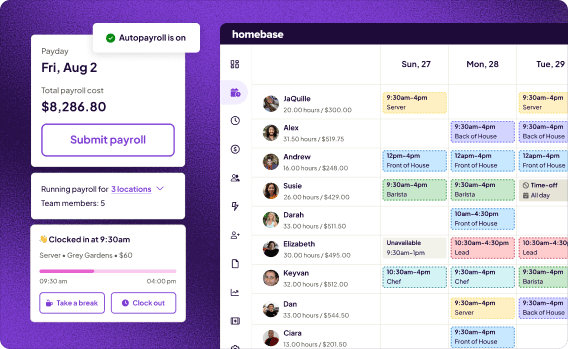
We're Homebase, and we make a free time clock app for small businesses with hourly teams. We have a stake in this topic, so we want to be upfront: Homebase isn't in the ranked list below, and every app there was evaluated on its own merits. We don't accept payment or backlinks for product mentions.
That said, we've spent years working with over 150,000 small businesses on exactly these problems, from timesheets that don't add up to payroll prep that swallows an afternoon. We know what breaks, what works, and what to look for. Further down, we cover what Homebase offers so you can weigh us directly alongside the tools above.
Homebase is best for: Small businesses with hourly teams that want scheduling and time tracking free in one app, with payroll as an add-on.
Rating: G2: 4.6/5 (597 reviews) · Capterra: 4.6/5 (1,155 reviews)
Key features:
- Clock in from mobile, tablet, or kiosk, with GPS, photo capture, and PIN options (GPS and geofencing availability depends on plan)
- Real-time attendance view: who's in, who's late, who's approaching overtime
- Automatic alerts for missed punches, break violations, and overtime
- Payroll-ready timesheets that connect to popular payroll providers
- Free plan for one location with up to 10 employees
Pricing: Free for one location (up to 10 employees). Paid plans when billed annually: Essentials $24/month, Plus $56/month, All-in-one $96/month, per location. Monthly billing is higher. Payroll is a paid add-on at $49/month + $6/person.
What users like:
"Now it takes me about five minutes. I do payroll every week. I do go through the time sheets and just do a quick vet of everything. And if everything looks good, then I click click click. I'm through payroll." — Primo Stropoli, owner, Tetta's Market
What users criticize:
"Finally, I cancelled my service and they still charged my account..." — Jamie R., Chief Operations Officer, Capterra
How We Chose These Picks
Our research draws on recent verified user reviews from G2 and Capterra, and community discussion on Reddit, including this r/TimeTrackingSoftware thread where small business owners compared options firsthand. We prioritized reviews from the past 12 months to reflect where each product stands today. We did not independently test these products ourselves.
Selection criteria:
- Who the product is built for: hourly shift-based teams vs. general employee management tools
- Whether a free tier exists and what it actually covers
- Starting price and how costs scale with team size
- Core features: clock-in methods, GPS, payroll integration, scheduling tools
- Recent user sentiment, what people consistently praise and what they flag as problems
One thing worth knowing: many "best of" lists in this category are affiliate-driven, rankings that reflect commission rates more than actual testing. Our picks for employee hour tracking are drawn from verified user reviews and community discussion, not partnership agreements.
What Is Time Clock Software?
Time clock software is a digital tool that records when employees start and end their shifts. It replaces paper timesheets and punch cards with automatic tracking, capturing clock-ins by mobile app, browser, kiosk, or physical device, then calculates hours, overtime, and breaks and sends that data to payroll. For small businesses with hourly teams, it removes the manual math that causes most payroll errors.
Before digital tools, tracking hours meant a physical punch clock on the wall: employees slid a paper card in, the machine stamped it, and someone counted hours by hand at the end of the week. The math was tedious, the paper was losable, and errors happened every pay period.
Modern employee time clock software does all of that automatically. Your team clocks in from a phone, tablet, or shared kiosk. The app logs the timestamp, calculates their hours, accounts for breaks and overtime, and generates a timesheet you can send straight to payroll. No calculator, no paper, no Sunday-night guesswork.
One distinction worth knowing: time clock software and time tracking software aren't the same thing. Time clock software is built for attendance. It covers shift-based hourly workers who clock in and clock out. Time tracking software is built for projects, billing clients by the hour or tracking where time goes across tasks. If you manage hourly employees and run payroll by the hour, you want an employee time clock. If you bill clients for hours worked, you want a time tracker.
Types of Time Clock Software
Time clock software comes in several forms: mobile apps, browser-based kiosks, physical biometric terminals, and GPS-enabled field tools. Most small businesses use a mobile or kiosk-based app. The right type depends on where your team works: a retail shop needs something different from a construction crew spread across job sites.
Mobile time clock apps
Employees clock in from their own smartphones, iOS or Android. This is the most common setup for restaurants, salons, retail, and service businesses where team members already carry their phones. The app logs the timestamp, often with GPS confirmation or a photo capture to verify identity. Offline behavior varies by product — some apps cache clock-ins and sync when a connection is restored, while others require an active internet connection for all clock-in functions. Check this carefully before choosing a tool for locations with unreliable service. See our picks for the best mobile time clock apps if this is your primary use case.
Kiosk-mode time clocks
A shared tablet or computer at your location, employees punch in with a PIN, QR code, or face photo. This works well for businesses where team members don't use personal devices on the clock (think: a kitchen where phones stay out of the work area, or a shop where everyone checks in at a central station). Kiosk mode is also a solid time-theft prevention layer: photo capture at clock-in makes it much harder for one employee to clock in for another.
GPS time clocks for field teams
Clock-ins tied to location verification. Geofencing draws a virtual boundary around a job site, and employees can only clock in when they're physically inside that boundary. This matters for construction crews, home service technicians, delivery drivers, and anyone whose "office" changes by the day. If you manage a mobile team, GPS time clock apps are worth treating as a non-negotiable. Note that offline capability varies significantly across field-focused tools — confirm this with each vendor before committing.
Physical vs. digital time clocks
Physical punch clocks, the wall-mounted machines that stamp paper cards or scan fingerprints, still make sense in specific situations: no-smartphone environments, very stable teams, or businesses where internet reliability is a real problem. For most small businesses in 2026, a digital app beats a physical machine on one factor alone: payroll integration. A physical clock creates a paper record; a digital app creates a payroll-ready file. See our full breakdown of physical vs. digital time clocks to figure out which fits your setup.
Cloud-based time tracking
Cloud-based time clock software stores data on remote servers rather than local hardware, which means your timesheets sync in real time, managers can see attendance from anywhere, and you're not dependent on a single computer to run payroll. For small businesses with multiple locations or remote managers, cloud-based time tracking is the default. The on-premise alternative just introduces maintenance overhead that most owners don't need.
Key Features to Look For in Time Clock Software
The most important features in time clock software for small businesses are: accurate clock-in methods that prevent fraud, automatic timesheet generation, a clean payroll export or direct integration, and real-time attendance visibility. Everything else adds value depending on your team's setup and where hours tend to go missing.
Clock-in verification methods. How does the app confirm it's actually your employee clocking in? GPS confirms location. Photo capture shows who punched in. Facial recognition goes a step further. PIN entry is the baseline. For businesses where buddy punching is a concern (one employee clocking in for another), layering at least two verification methods is worth it. Note that not every method is available on every plan — check the plan tiers before assuming a feature is included. See employee time clock apps for a breakdown by verification type.
Automatic timesheet generation. Once employees clock in and out, the app should calculate hours automatically, including breaks, splits, and overtime. You shouldn't be adding up numbers in a spreadsheet. If you are, the tool isn't doing its job. Digital timesheets eliminate the manual math that causes most payroll errors and give you a clean record to review before pay runs.
Overtime and break tracking. The app should calculate overtime automatically based on your pay rules, daily, weekly, or both, and alert you when a team member is approaching the threshold. A good time clock also tracks when breaks start and end, flags missed breaks, and keeps you on the right side of state break laws. See how overtime alerts prevent payroll surprises before they happen.
Payroll integration. The cleaner the handoff from timesheets to payroll, the less room for error. Native integrations, where the time clock talks directly to your payroll software, beat CSV exports every time. Know which payroll providers your time clock connects to before you commit, this is covered in the picks section below. Learn more about payroll integration and what to look for.
Real-time attendance visibility. A good time clock shows you who's in, who's late, and who's approaching overtime right now, not just after the shift ends. This matters most for managers who aren't physically on-site, or businesses with multiple locations.
Scheduling integration. If scheduling and time tracking live in separate apps, you're creating manual work every time a shift changes. When they're in the same app, clock-ins tie directly to the scheduled shift, which means early clock-ins can be blocked, no-shows are flagged automatically, and your employee hour tracking reflects your actual schedule rather than a separate log.
Mobile access. Your managers need to approve timesheets and handle exceptions on the go. Your team needs to clock in from their phones. iOS and Android support, a clean mobile interface, and some level of offline capability are requirements worth checking for any time clock app you consider.
Reporting and audit trails. Every edit to a timesheet should be logged: who changed it, when, and what it was before. This protects you in disputes and keeps your records clean for compliance. Good reporting also surfaces labor cost patterns over time: which shifts run over, which roles clock the most overtime, where your hours are going.
How to Choose Time Clock Software for Your Business
The right time clock software depends on three things: where your team works, how you run payroll, and what's causing the most friction right now. A restaurant with 15 servers has different needs than a two-location retail shop or a field crew spread across job sites. Start with your biggest bottleneck and work backward from there.
For restaurants and food service
Restaurants run on shifts, and shift-based clock-ins are exactly what time clock software is built for. The features that matter most here: employee scheduling and time tracking in the same app (so clock-ins tie to the shift, not just a timestamp), tip management, and a payroll integration that handles hourly plus tip income cleanly. High turnover also means the clock-in experience needs to be dead simple, a new hire should be able to figure it out on their first shift without a walkthrough. Connecteam and Homebase are both worth considering for restaurant scheduling and time tracking together.
For retail
Retail businesses often deal with seasonal swings in team size and multiple locations, both of which put pressure on a time clock that can scale. Look for a tool that handles variable team sizes without punishing you on per-user pricing during your busy season, and one that lets managers at different locations see their own team's attendance without accessing everyone else's data. Deputy's multi-location controls are well-regarded for this use case.
For construction and field teams
GPS verification is non-negotiable. When your crew is spread across job sites, you need clock-ins that confirm location, not just time. Geofencing blocks clock-ins outside a set radius and is the cleanest way to do this. Offline capability is worth verifying carefully: some job sites have spotty service, and clock-in behavior without an internet connection varies significantly across tools. For more on what to look for, see our guide to construction time tracking software.
For salons and service businesses
Salon teams are usually small, often five to fifteen people, which means a free plan or a low-cost paid tier is likely enough. The scheduling side matters here too: appointments create a natural shift structure, so a time clock that ties clock-ins to scheduled appointments or shifts prevents employees from clocking in early or staying late without authorization. Photo capture at clock-in is a common feature in this category and adds a light layer of accountability without feeling punitive.
Free vs. Paid Time Clock Software
Free time clock software works well for very small teams or businesses just moving off paper. The tradeoff is almost always the same: free plans limit GPS controls, payroll integrations, or team size. If you're managing more than 10 employees or need a direct payroll handoff, a paid plan at $4–$8 per user per month is often worth evaluating.
Here's where free plans tend to draw the line:
- GPS and geofencing are almost always locked behind paid tiers
- Payroll integrations are often limited or unavailable on free plans
- User caps are common: Connecteam's free plan covers up to 10 users; Clockify's free plan currently supports up to five users
- Reporting and audit logs are typically reduced on free plans
When free is enough: you have fewer than 10 employees, your payroll process is simple, and GPS verification isn't a priority.
When to upgrade: you're managing more than 10 people, you're losing time to manual payroll prep, you need GPS controls to prevent time theft, or you're getting compliance questions you can't answer with your current records.
See our full guide to free time clock apps and free time tracking software to compare what each free plan actually includes.
Time Clock Software and Payroll: How They Work Together
Time clock software and payroll work best when they're connected, either through a direct native integration or a clean data export. The goal is to get hours from clock-out to paycheck without anyone touching a spreadsheet in between. The tools that do this best either integrate natively with your payroll provider or include payroll in the same app.
There are two ways time clock software hands off to payroll:
Native integration means the time clock and payroll software talk directly to each other. Clock-in data flows automatically, with no export, no file upload, and no copy-paste. QuickBooks Time connecting to QuickBooks Payroll is the clearest example of this: one system, no handoff step. This is the cleanest option and the one least likely to introduce errors.
CSV export means the time clock generates a file, usually a spreadsheet of hours worked, that you import into your payroll software manually. Most time clock tools support this as a baseline. It works, but it adds a step, and that step is where errors tend to creep in.
Before choosing a time clock tool, confirm it integrates directly with your payroll provider. Common integrations to check:
- QuickBooks Payroll and QuickBooks Online
- ADP and ADP Run
- Paychex
- Gusto
- SurePayroll
For small business time tracking that connects to payroll without manual cleanup, the tools in this guide all offer at least a CSV export, and most have at least one native integration. Your timesheets should never be a bottleneck between hours worked and payday.
Time Theft and Compliance: What Time Clock Software Prevents
The two most common problems time clock software solves are time theft (buddy punching, early clock-ins, inflated hours) and payroll compliance failures like missed breaks, unpaid overtime, and incomplete recordkeeping. The right software doesn't just track hours. It creates an audit trail that protects the business and keeps pay fair for the whole team.
Buddy punching is when one employee clocks in or out on behalf of another, intentionally or as a favor. It's one of the most common sources of payroll inaccuracy in hourly businesses. Photo capture and facial recognition make it hard to fake. GPS verification confirms the right person is in the right place. PIN entry is the baseline; layering in a second verification method closes most of the gap.
FLSA recordkeeping is the federal baseline. The Fair Labor Standards Act (FLSA) requires employers to keep accurate records of hours worked for all non-exempt employees, including start and end times, total hours, and wage information. The Department of Labor requires payroll records to be retained for at least three years, and time cards and records used to calculate wages for at least two years. Time clock software creates those records automatically and keeps them in one place. For the current requirements, see the DOL FLSA recordkeeping fact sheet.
Overtime and break compliance vary by state, but the federal baseline is straightforward: overtime kicks in after 40 hours in a week for non-exempt employees, and it must be paid at 1.5x the regular rate. A good time clock tracks hours toward that threshold in real time, alerts managers before overtime occurs, and flags missed breaks so you can address them before they become a wage complaint. Learn how overtime alerts work in practice, and check your state's requirements through labor law compliance guidance.
The audit trail matters beyond compliance, too. When a pay dispute comes up, and at some point it will, having a timestamped, unedited record of every clock-in, clock-out, and timesheet edit is the difference between a resolved conversation and a prolonged one.
Best Time Clock Software for Small Businesses in 2026
Here are the five top-rated time clock tools for small businesses this year, each evaluated on its own merits based on verified user reviews, current pricing, and feature documentation. The picks below are not sponsored or affiliate-driven.
1. Buddy Punch
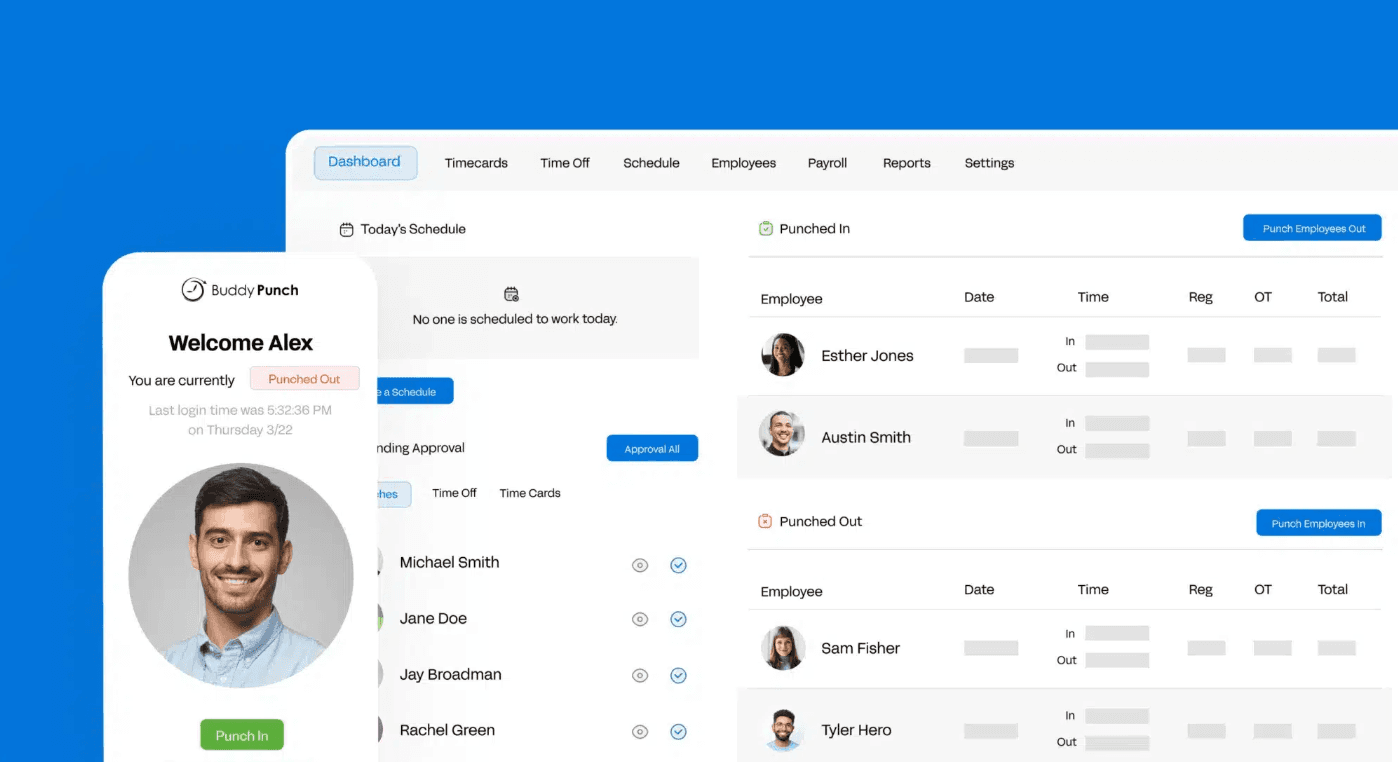
Best for: Small to mid-sized businesses that prioritize multiple clock-in verification options and reliable payroll exports.
Buddy Punch offers a wide range of clock-in verification methods and exports cleanly to QuickBooks, ADP, Paychex, and SurePayroll. Setup is fast, the mobile app mirrors the desktop, and users consistently rate it among the easier tools in the category to get up and running. Note that not all verification methods are available on the entry-level Starter plan; some, including geofencing and advanced GPS controls, are add-ons or require a higher tier.
What it is: A time and attendance and cloud-based time clock tool built for small to mid-sized businesses with hourly or field employees. It tracks hours, manages PTO, and exports payroll-ready timesheets.
Key features:
- Clock in via Face ID, QR code, PIN, facial recognition, or mobile app (availability varies by plan)
- GPS tracking and geofencing, configurable per employee or team-wide (add-on on Starter)
- Payroll exports to QuickBooks, ADP, Paychex, and SurePayroll
- Automatic overtime calculations and PTO accrual tracking
- Role-based permissions and single sign-on
Pricing: Starter plan: $4.99/user/month annually + $19/month base fee. Pro plan: $6.99/user/month annually + $19/month base. Monthly billing is higher. Scheduling is a $1/user/month add-on on Starter. No free plan; 14-day free trial available.
What users like:
"I like how fast, easy, and simple it is to use. I don't have to click through multiple screens just to get to my punch in/out. I can use it on either desktop or mobile, and I don't really have to think about it once I'm in." — Matthew W., G2, February 2026
What users criticize:
"One of the main drawbacks of Buddy Punch was occasional technical issues, such as slow loading times or difficulty clocking in during periods of poor internet connectivity." — Andre F., Supervisor, Capterra, January 2026
Our take: Advanced features, including premium GPS controls and enhanced reporting, are locked behind higher-tier plans or sold as add-ons, which can push costs up for growing teams. Verify that the payroll provider you use is on Buddy Punch's integration list before committing, and confirm which verification methods are included on the plan you're considering.
2. QuickBooks Time
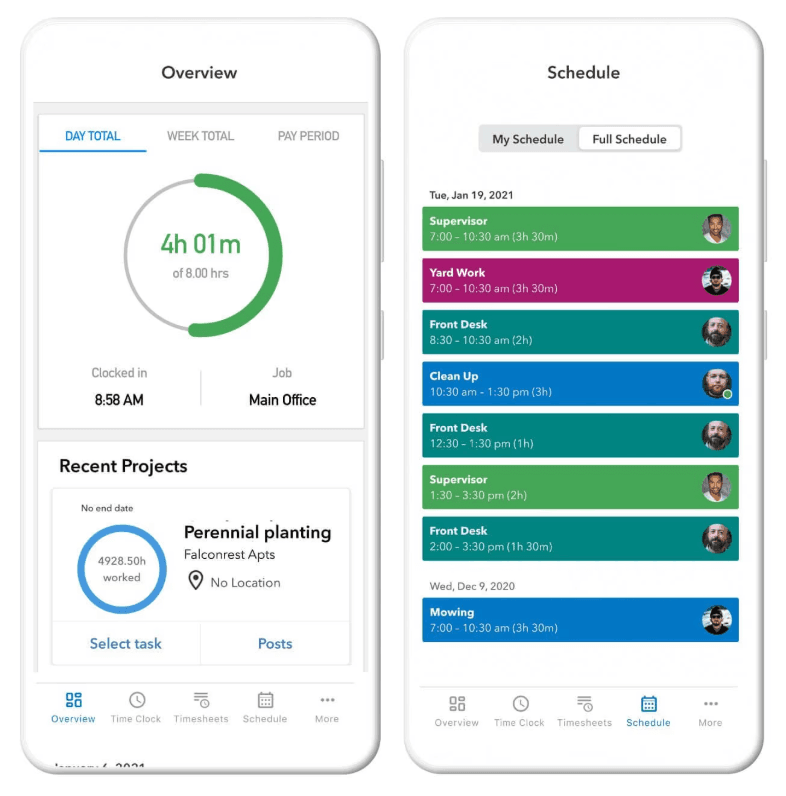
Best for: Small businesses already using QuickBooks Online or QuickBooks Payroll who want time tracking in the same ecosystem.
QuickBooks Time earns its spot primarily for one reason: it's Intuit's native time tracking tool and integrates directly with QuickBooks. For business owners who already run payroll and accounting through Intuit, the native sync removes a full step from the process. GPS tracking and mobile clock-ins are available on both plans; geofencing is Elite-only.
What it is: An employee time tracking and scheduling tool from Intuit, built to connect directly with QuickBooks Online and QuickBooks Payroll for a frictionless hours-to-paycheck workflow.
Key features:
- Native QuickBooks Online and QuickBooks Payroll integration, no separate sync
- GPS and location tracking on both plans; geofencing is Elite-only
- Job codes and project tracking for cost reporting
- Mobile clock-in with real-time attendance visibility
- Schedule building and shift notifications
Pricing: Time Premium: $20/month base + $10/user/month. Time Elite: $40/month base + $12/user/month. Included free with QB Payroll Premium/Elite. 30-day free trial available.
What users like:
"What stands out most about QuickBooks Time is how seamlessly it connects time tracking with payroll and accounting..." — Merlyn M., G2, April 2026
What users criticize:
"It can feel expensive and somewhat limited compared to other time-tracking tools." — Reviewer, G2
Our take: QuickBooks Time requires a QuickBooks account, so it's most naturally suited to businesses already using the Intuit ecosystem. If you're not, the total cost adds up quickly compared to standalone options. Geofencing is locked to the Elite tier, and per-user pricing climbs faster than some alternatives at team sizes above 10.
3. Deputy
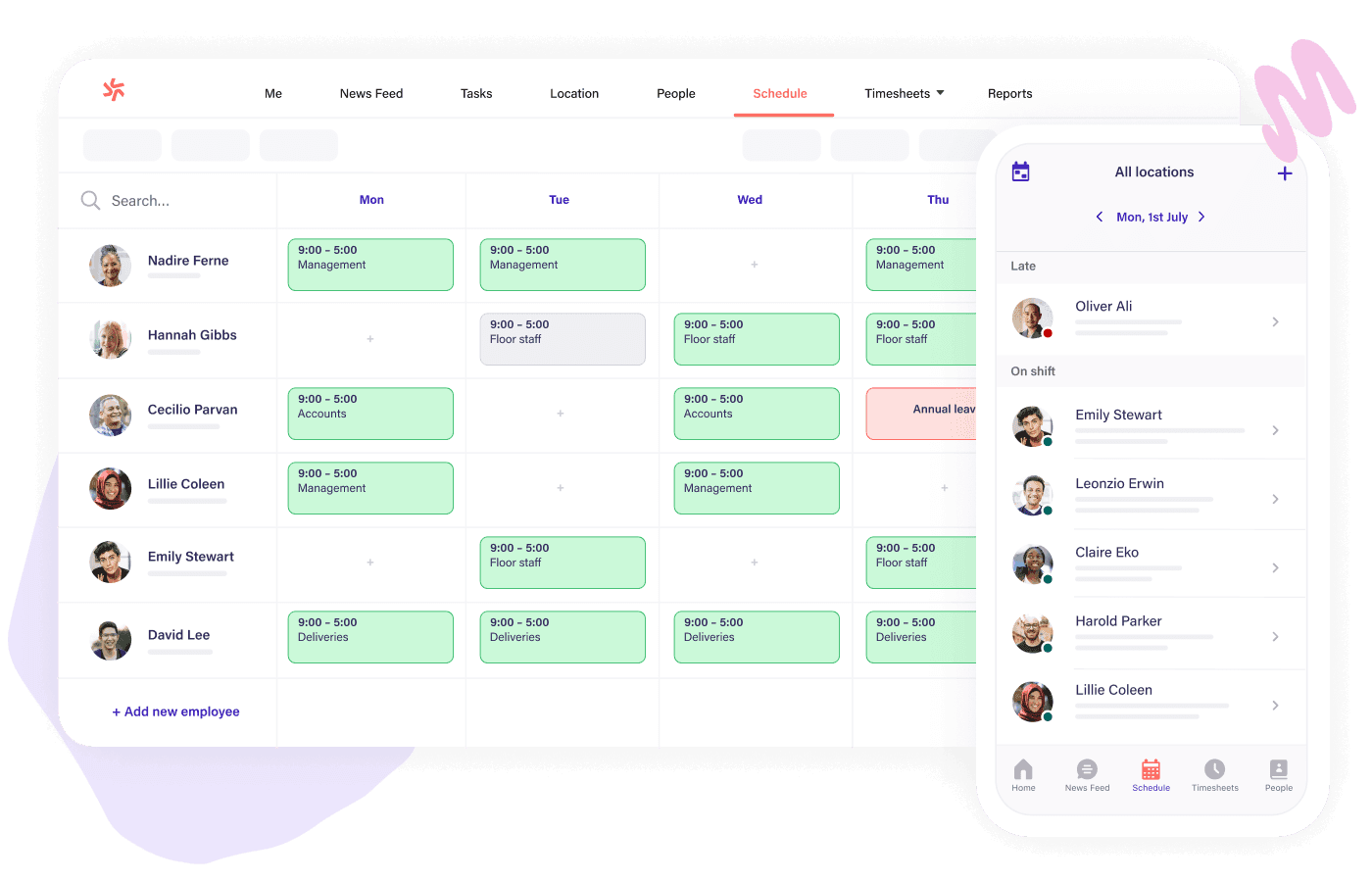
Best for: Multi-location businesses and distributed teams that need scheduling and time tracking together, with strong compliance tools built in.
Deputy is a well-regarded option for businesses juggling multiple locations, complex shift patterns, or compliance-heavy environments. Its auto-scheduling engine, mobile-first design, and labor compliance features set it apart from basic time clocks. The mobile app earns consistent praise for ease of use across both manager and employee views.
What it is: A cloud-based scheduling and time tracking tool built for shift-based businesses. It combines employee clock-in, shift management, demand-aware scheduling, and payroll integrations in one mobile-first app.
Key features:
- Mobile clock-in with facial recognition and geofencing
- Auto-scheduling based on availability, skills, and labor budget
- Compliance prompts for breaks and overtime by state and region
- Integrations with Xero, Gusto, ADP, and MYOB, among others
- Real-time shift swap and notification tools
Pricing: Lite $5/user/month, Core $6.50/user/month, Pro $9/user/month. All plans have a $30 minimum monthly spend. No permanent free plan; free trial available.
What users like:
"My experience with Deputy has been positive. It has made managing shifts and staying updated much easier." — Portia A., Capterra, April 2026
What users criticize:
"Sometimes the app can be a bit slow or glitchy, especially when trying to load shifts." — Portia A., Capterra, April 2026. Some Capterra reviewers have also flagged that weekend support availability can be limited.
Our take: Per-user pricing adds up for large teams with high turnover. For multi-location complexity, Deputy's compliance and scheduling depth is difficult to replicate at this price point — particularly for businesses in regulated environments where break and overtime rules vary by location.
4. Clockify
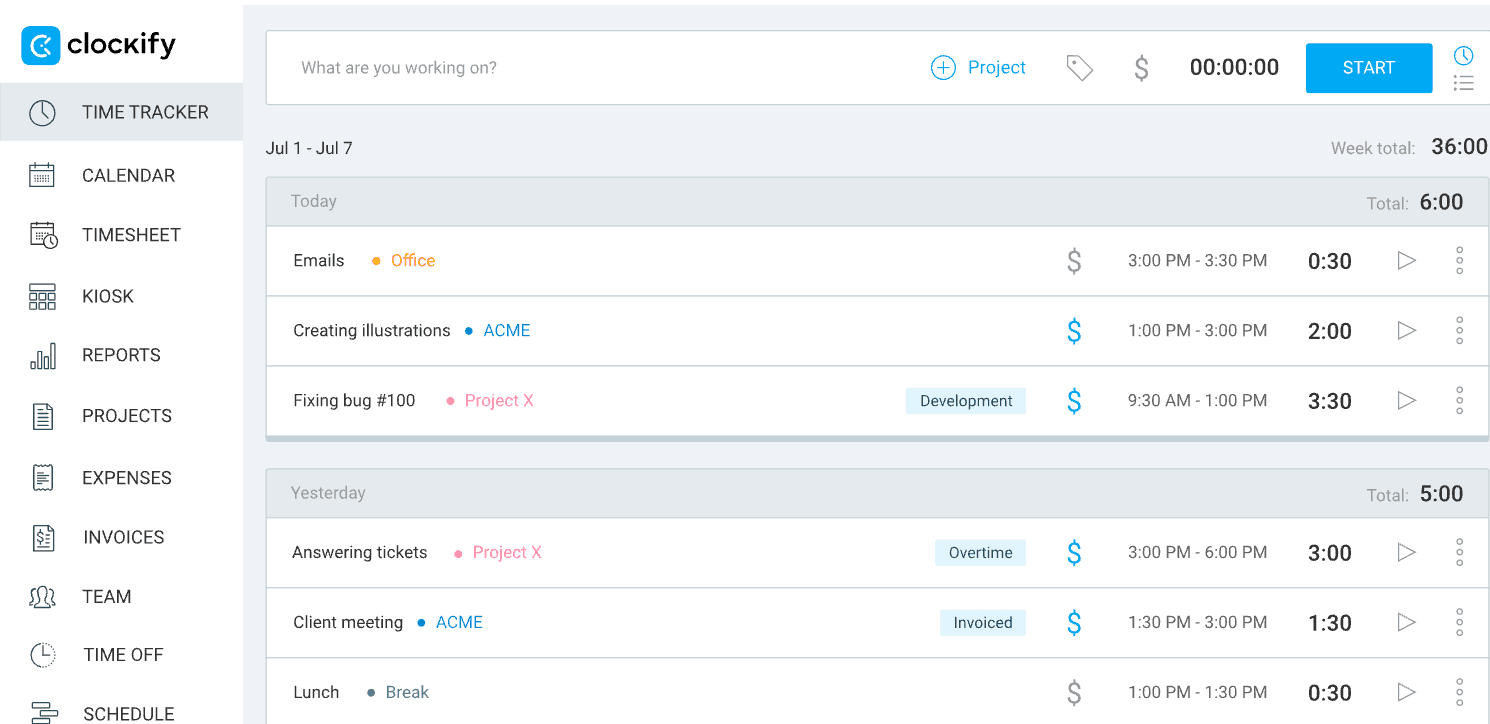
Best for: Very small teams (up to five users) who want to start tracking time digitally at no cost.
Clockify offers a free plan for teams of up to five users, with no expiration date and no commitment required. Setup takes under 30 minutes. The tradeoff: the mobile app lags behind the desktop, payroll-ready exports require a paid upgrade, and the tool is built primarily around project-based tracking rather than shift-based attendance.
What it is: A free cloud-based time tracking tool. It supports basic clock-in/out, project tracking, timesheets, and reporting on the free plan, with GPS tracking (Pro plan) and accounting integrations (Standard plan) available on paid tiers.
Key features:
- Free plan for up to five users with unlimited time tracking and basic reporting
- Time tracking via web, desktop, and mobile (iOS and Android)
- GPS tracking on the Pro plan; QuickBooks integration on the Standard plan
- Integrates with QuickBooks, Xero, Slack, and Asana on paid tiers
- Exportable timesheets at no cost (CSV format)
Pricing: Free for up to five users. Paid plans start at $3.99/user/month (Basic, annual billing).
What users like:
"It's nice that I'm no longer required to document my hours on a notebook." — Gurjeev A., Capterra, September 2026
What users criticize:
"The photo taking feature is very odd and somewhat creepy; What if I have a personal medical email open and it captures a photo?" — Reviewer, Capterra
Our take: Clockify is built primarily around project-based time tracking, not shift-based hourly work. If your main need is scheduling, attendance visibility, overtime alerts, or payroll handoffs, you'll outgrow the free tier quickly. For teams of five or fewer who just need to stop tracking hours in a spreadsheet, it's a solid no-cost starting point.
5. Connecteam
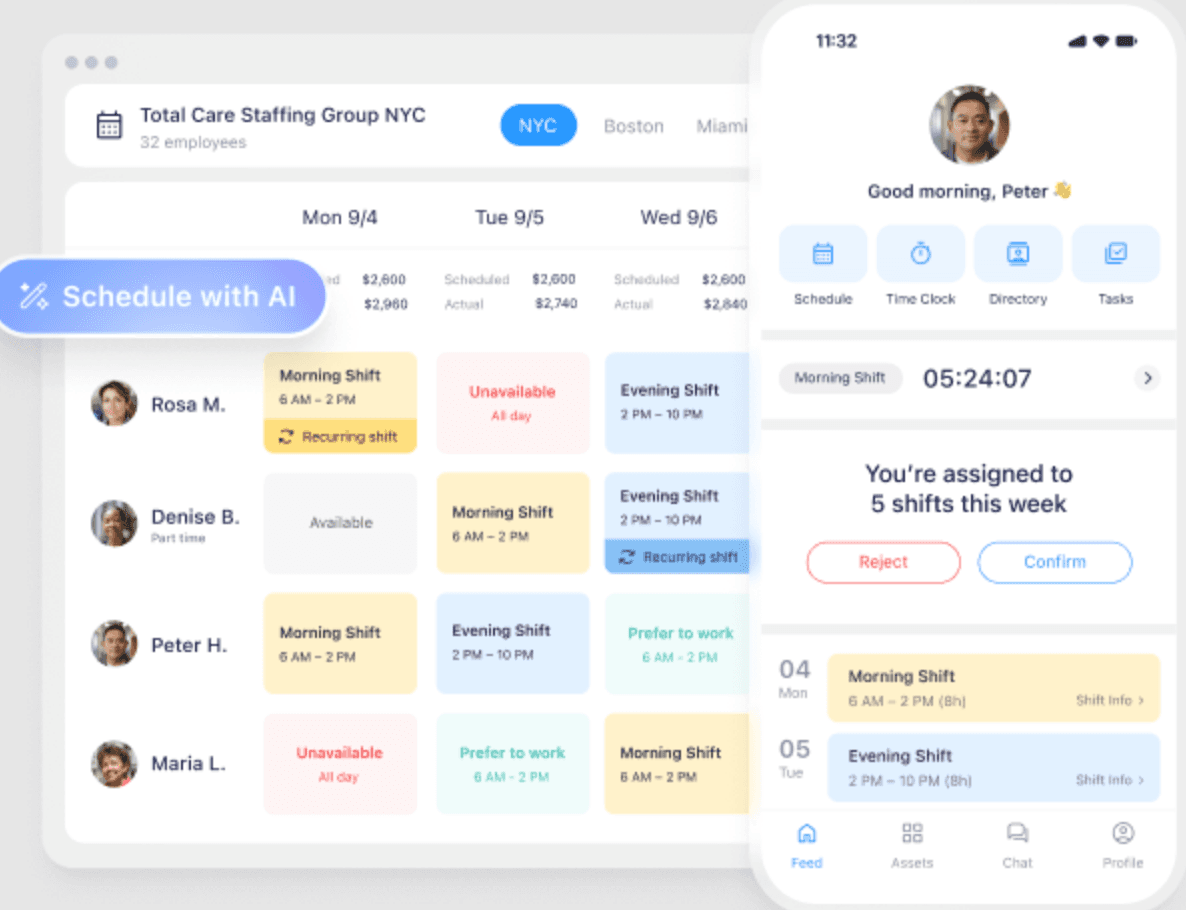
Best for: Deskless and field teams — construction, cleaning, security, home services — that need scheduling, time clock, and team communication in one mobile app.
Connecteam packs scheduling, GPS time clock, team chat, task management, digital forms, and training into one app. The free plan covers up to 10 users. For deskless teams spread across job sites, it removes the need for several separate tools. One important note: Connecteam's standard time clock does not support offline clock-ins. All clocking features, including mobile, kiosk, desktop, and NFC, require an active internet connection.
What it is: An all-in-one employee management app built for non-desk teams. It combines time tracking, scheduling, team communication, HR tools, hiring, and task management in a single mobile-first app.
Key features:
- GPS clock-in with geofencing and kiosk mode (requires internet connection)
- Free plan for up to 10 users
- Scheduling, task management, and team messaging in one app
- NFC clock-in option for hands-free punch-in (from Basic Operations plan)
- Integrates with Gusto, Xero, Paychex, and QuickBooks
Pricing: Connecteam uses a hub-based pricing structure. The Operations Hub (which includes time clock and scheduling) is $29/month for the first 30 users on the Basic plan, and $49/month for Advanced, when billed annually. Monthly billing is higher. Additional users are charged separately. Free plan available for up to 10 users.
What users like:
"It offers a wide range of tools that help us manage scheduling, communication, and daily operations all in one place..." — Julia C., Capterra, April 2026
What users criticize:
"The payroll integration was the worst experience we had with Connecteam. When we integrated the time clock to Gusto, it was a disaster. Tracking, approving, and paying hours became double the work." — Verified user, Capterra
Our take: Test the payroll handoff carefully before committing. This issue appears consistently in recent reviews, especially for businesses that pay W-2 employees and 1099 contractors on different schedules. The lack of offline clocking is also worth flagging for field teams in areas with spotty service. For teams with reliable connectivity that want scheduling, GPS tracking, task management, and messaging in one app, Connecteam covers a lot of ground at a competitive price.
Which time clock software fits your business?
Not sure where to start? Here's the quick version.
- Want multiple clock-in verification options and broad payroll integrations? → Buddy Punch
- Already using QuickBooks and want payroll to run itself? → QuickBooks Time
- Managing multiple locations with complex schedules? → Deputy
- Need to start tracking time today at zero cost (up to five users)? → Clockify
- Running a deskless or field team and want one app for scheduling, tracking, and communication? → Connecteam
How Homebase Fits In
Publisher note: Homebase publishes this guide. The following reflects what our product offers — it's here so you can weigh us alongside the tools above.
We make a free time clock app built specifically for hourly teams, restaurants, retail shops, salons, healthcare clinics, and anywhere shifts drive the day. What sets us apart from most tools on this list is that scheduling and time tracking connect in the same app. You build the schedule, employees clock in against it, and hours flow to payroll-ready timesheets without any copy-paste.
Here's what that looks like in practice:
- Clock in from mobile, tablet, or kiosk, with GPS, geofencing, photo capture, and PIN options
- See real-time attendance as shifts start: who's in, who's late, who's nearing overtime
- Get automatic alerts for missed punches, break violations, and overtime before they become payroll problems
- Send hours to popular payroll providers, or run payroll in-app when you're ready
- Free plan available for one location with up to 10 employees
"Now it takes me about five minutes. I do payroll every week. I do go through the time sheets and just do a quick vet of everything. And if everything looks good, then I click click click. I'm through payroll." — Primo Stropoli, owner, Tetta's Market.
Frequently Asked Questions About Time Clock Software
What is the best time clock software for small businesses?
The answer depends on your setup. Buddy Punch is a well-reviewed all-around pick, compatible with the most common payroll providers and offering multiple clock-in verification methods. QuickBooks Time is the natural call if you're already on QuickBooks. For teams that want scheduling and time tracking together in one free app, Homebase is worth comparing directly. The right fit depends on your payroll setup, team size, and whether you need GPS verification.
What is the best free time clock software?
Clockify's free plan covers up to five users with unlimited time tracking and no expiration date. Connecteam's free plan covers up to 10 users with access to its core features, including GPS clock-in and scheduling. Homebase also has a free plan for one location with up to 10 employees. The best free option depends on your team size and whether you need shift-based scheduling alongside time tracking.
Which time clock software has the best payroll integration?
QuickBooks Time connects natively to QuickBooks Payroll, no separate sync, no data export required. Buddy Punch integrates directly with QuickBooks, ADP, Paychex, and SurePayroll. Connecteam connects to Gusto, Xero, and Paychex, though recent reviews flag occasional friction with mixed W-2 and 1099 setups. Verify the specific integration before committing.
How much does time clock software cost?
Most paid time clock software runs $4–$10 per user per month, often with a monthly base fee on top. Buddy Punch's Starter plan starts at $4.99/user plus $19/month (annual billing). Deputy starts at $5/user/month. Clockify and Connecteam both offer free plans. Costs rise as you add GPS controls, compliance tools, and direct payroll integrations.
What features should I look for in time clock software?
Look for accurate clock-in methods (GPS, PIN, or photo), automatic timesheet generation, a clean payroll export or integration, and real-time attendance visibility. For shift-based teams, scheduling tools in the same app remove a layer of manual work. Ease of use for your team members matters as much as features — the best tool is the one your team actually uses every shift.
What's the difference between time clock software and time tracking software?
Time clock software is built for attendance — shift-based hourly workers who clock in and out. Time tracking software is built for projects, billing clients by the hour or tracking where time goes across tasks. If you manage hourly employees and run payroll by the hour, you want time clock software. If you bill clients for hours worked, you want a time tracker.
Can time clock software help prevent time theft?
Yes. GPS verification confirms employees are on-site when they clock in. Photo capture and facial recognition prevent buddy punching. Geofencing restricts clock-ins to approved locations. Together, these controls create an audit trail that deters fraud and makes disputes easier to resolve with documented records.
Is time clock software required by law?
No federal law requires time clock software specifically, but the FLSA does require employers to keep accurate records of hours worked for non-exempt employees. Time clock software makes this easier to do and harder to get wrong. Some states have additional timekeeping requirements — check your state labor laws and time clock rules for hourly employees for specifics.
The Bottom Line on Time Clock Software
The right time clock software depends on your biggest bottleneck. Payroll errors, time theft, and scheduling chaos are all solvable, but different tools solve them differently. Most small businesses don't need the most feature-rich option. They need the one their team will actually use every shift.
Clockify gets you started for free (up to five users). Buddy Punch or Connecteam carry you as you grow. QuickBooks Time is the clear call if you're already in that ecosystem. And if your team runs on shifts, hours going missing before payday isn't a process problem. It's a tool problem.
Homebase keeps time tracking, scheduling, and payroll in one place so nothing falls through the cracks. Try it free