Best Time Tracking Software for Small Businesses in 2026


SMALL BUSINESS INTEL, IN YOUR INBOX
Table of contents
Every week, small business owners who manage hourly teams lose hours they'll never get back — not because their employees aren't working, but because the paperwork is wrong. A missed punch here, a manually calculated overtime there, a timesheet that doesn't match what anyone remembers. By the time payroll runs, someone's chasing a correction or just guessing.
Time tracking software records hours automatically, flags issues before payday, and gets clean data into payroll without the manual back-and-forth. But the market is crowded, and most tools aren't built for businesses with hourly teams. They're built for project billing, remote workers, or enterprise IT departments.
This guide is for small business owners who track time for shift-based employees. We cover 9 of the best time tracking apps for small businesses in 2026, what each does best, honest pricing, and how to choose without overthinking it.
TL;DR: Best Time Tracking Software for Small Businesses
Here's the shortlist and what each tool does best.
- Homebase: Best for small businesses with hourly teams
- Toggl Track: Best for agencies and creative freelancers.
- Hubstaff: Best for remote teams that need productivity visibility.
- Harvest: Best for consultants who invoice hourly.
- Jibble: Best free attendance tracker with biometric clock-in.
- Clockify: Best free option for project-based billing.
- QuickBooks Time: Best for mobile and field teams already using Intuit.
- Buddy Punch: Best for small teams wanting GPS and scheduling without complexity.
- Connecteam: Best for field crews and deskless workers.
Why Trust Homebase? Here's Why We Wrote This Guide
We're Homebase — an all-in-one scheduling, time tracking, and payroll app built specifically for small businesses with hourly teams. Restaurants, retailers, salons, gyms, cleaning crews, healthcare offices. We've spent years working with businesses exactly like yours, and we know what actually matters when people are clocking in from a job site, a counter, or a back-of-house iPad.
Our time clock isn't just a timer. Here's what we built it to do:
It works on any device. Your team can clock in from a phone, tablet, computer, or POS system — whatever's already in front of them. No new hardware required.
It catches problems before payday. Photo verification, GPS location confirmation, and early clock-in prevention tools mean you're not dealing with buddy punching or inflated hours at the end of a pay period. Automated break reminders keep you compliant without you policing every shift.
It calculates the hard stuff automatically. Multiple wage rates, overtime tracking, PTO accrual — Homebase handles the math so you don't have to. The FLSA-compliant timecard storage means you're covered if you ever face an audit.
It connects directly to payroll. Hours flow from the time clock into payroll with one click, whether you use Homebase Payroll or sync to QuickBooks or Gusto. One of our customers put it best: "The seamless way the data goes over to QuickBooks and I can run payroll with a couple button clicks is great."
That background shapes how we evaluate every tool in this guide. We're not looking for the shiniest feature list. We're looking for what actually holds up when a team member forgets to clock out, when overtime is creeping up on Friday afternoon, and when payday comes and the numbers have to be right.
Our job here is to help you find the right fit, even if that's not us.
How We Chose These Tools
We evaluated time tracking tools against five criteria that matter most to small businesses with hourly teams:
- Ease of use. Can a team member clock in on day one without training?
- Pricing model. Does the cost structure make sense for an hourly team?
- Payroll integrations. Native sync or CSV export?
- Mobile capability. Does it work from a phone, with GPS?
- Feature fit for hourly teams. Scheduling, overtime alerts, break tracking — not just a timer.
We also pulled user sentiment from G2, Capterra, and Reddit to surface what real users praise and what frustrates them after 6 to 12 months of actual use — not just first impressions. Star ratings were pulled in July 2026 and tend to be stable; review counts change frequently.
The 9 Best Time Tracking Apps for Small Businesses in 2026
Every tool on this list made it for a specific reason: it's the strongest option for a particular type of small business. None of these is the right answer for everyone. The right answer depends on your team type, your payroll system, and what "free" really means in practice.
1. Homebase
Best for: Small businesses that want GPS-verified clock-ins and clean timesheets that flow straight into payroll, without a separate time clock system.
Rating: G2 4.6 · Capterra 4.6
What it is: Homebase is the everything app for hourly teams, and its time clock tracks hours, breaks, and overtime from phones, tablets, computers, or a Clover POS. Every clock-in becomes a timesheet automatically, and approved hours flow into payroll without anyone re-entering a number.
Key features:
- Clock in and out from any device with a unique PIN, no shared hardware required
- Geofencing that flags a clock-in outside a set radius of the job site, starting on the Essentials plan
- Automatic overtime and late-clock-in alerts, plus auto clock-out and time rounding on the Plus plan
- Photo verification at clock-in, so you know who's actually punching the clock
- Labor cost tracking by hour, department, and role, so you can see where hours are going before payday, not after
Free trial? Yes, 14-day free trial of the All-in-One plan.
Free plan? Yes, Homebase has a free Basic plan for one location and up to 10 employees.
Pricing: Paid plans start at $24 per location per month billed annually. Pricing is per location rather than per employee, so paid plans cover unlimited team members.
What users say: "Homebase takes a picture of the employee when they clock in. Having something there that I could rely on, something that's reliable that I can depend on and trust. I could track employees even when I'm not always at the store." — Primo Stropoli, owner, Tetta's Market. Read the case study.
2. Toggl Track — Best for Agencies and Creative Teams

Toggl Track is a lightweight, project-focused time tracker built around speed and simplicity. You open it, hit start, and move on. There's no system to maintain, no onboarding friction, no overhead. That's exactly what freelancers and small desk-based agencies want — and it's why Toggl keeps coming up in those specific conversations.
The free plan covers up to 5 users, and the browser extension and integrations with Asana, Slack, and Stripe mean time often gets captured without anyone actively thinking about it. What it doesn't have is payroll, scheduling, or anything that helps manage shift-based hourly workers. That's a feature for its target user, not a gap — but it means the moment your needs grow operational, you'll outgrow it.
Pricing: Free plan (up to 5 users). Starter from $9/user/month (annually).
What real users say:
In r/TimeTrackingSoftware, Toggl consistently shows up in threads from people exhausted by bloated software — solo users and very small teams who want something that just works. In r/smallbusiness, solo business owners tracking time for pricing purposes gravitate toward Toggl for the same reason: it's fast, free for one person, and doesn't get in the way. The tradeoff noted across those threads is consistent — once workflows get more operational, Toggl starts showing its limits. For anyone managing field workers or hourly crews, it's rarely even mentioned.
Our take: Right tool for project-based businesses. If you're scheduling hourly team members, look elsewhere.
3. Hubstaff — Best for Remote Teams That Need Productivity Visibility

Hubstaff is a time tracking tool with built-in remote work monitoring — screenshots, keyboard and mouse activity, URL tracking, and GPS. It's built for distributed teams where managers need to know more than just when people clocked in. The activity monitoring, productivity dashboards, and payroll integrations make it a serious operational tool for remote-first organizations that have already established a culture of accountability.
That last part matters. Hubstaff works best in environments where the monitoring expectation is established upfront — it doesn't create trust, it requires it.
Pricing: Contact Hubstaff for current pricing.
What real users say:
In r/TimeTrackingSoftware, the pattern is nearly universal: managers recommend Hubstaff confidently, employees bring up screenshots. The thread author described it as "the tool that instantly splits a thread in two." Both sides are usually right about the facts — they just weigh them completely differently. G2 reviewers in consulting and virtual assistant businesses describe the activity data as useful for catching workflow bottlenecks. Employee-side reviews describe the monitoring features as demoralizing. Whether that tradeoff is worth it depends entirely on your team's existing trust level and your management philosophy.
Our take: Legitimate tool for the right context. It doesn't create a culture of accountability — it requires one. Deploy it without that foundation and you'll have an employee relations problem faster than a time tracking one.
4. Harvest — Best for Consultants and Agencies Billing Clients Hourly

Harvest is a time tracking and invoicing tool built around a single workflow: tracked time becomes a client invoice without friction. For consultants, agencies, and freelancers who bill by the hour, that connection is the whole value proposition — and it genuinely delivers.
Beyond invoicing, Harvest includes expense tracking, project budgets with alerts, team capacity planning, and 60+ integrations including Asana, Slack, and Stripe. What it doesn't include is payroll, scheduling, or any of the operational tools that shift-based teams need. It's purpose-built for client billing, and it doesn't pretend to be anything else.
Pricing: Free plan (1 user, 2 projects). Paid plans available — check getharvest.com/pricing for current tiers, which have changed recently.
What real users say:
Harvest has the strongest user loyalty on this list among freelancers and agencies — even though people complain about the pricing constantly. In r/TimeTrackingSoftware and r/smallbusiness, the invoicing workflow is what drives that loyalty — tracked time becomes a billable invoice without much in between. G2 reviewers describe it as "the tool that finally made invoicing feel automatic." The criticism is the ceiling: once teams grow past a certain size, the per-seat cost math stops making sense, and users start looking at alternatives.
Our take: Purpose-built for service businesses that live by billable hours. Not an HR and operations tool and doesn't pretend to be.
5. Jibble — Best Free Attendance Tracker for Deskless Teams

Jibble is an attendance-first time tracker with AI facial recognition, GPS tagging, and a free plan that covers unlimited users. For businesses where buddy punching is a real problem and budget is tight, that combination is genuinely hard to beat. The free plan includes automated timesheets and leave management — not just basic clock-in.
The facial recognition uses liveness detection, which means someone can't just hold up a photo to clock in. GPS tagging confirms location at punch-in without background tracking throughout the shift — a meaningful difference from surveillance-style monitoring.
Pricing: Free plan (unlimited users). Paid plans available — check jibble.io for current pricing.
What real users say:
In r/software and r/CRMSoftware, Jibble consistently shows up as the tool people land on after trying Toggl, Clockify, or Harvest first. One r/software commenter described their ecommerce team's experience: "We've been using Jibble for about a month — the hours tracking on the free plan is more than enough for what we need, and it easily works with some Make.com integrations to process our payroll. Definitely recommend, been 10/10 for us." Another r/CRMSoftware user noted they specifically chose it because affordable is tricky when tools charge per user — Jibble's free plan removes that pressure entirely. The main criticism in these threads is limited payroll integration depth compared to dedicated payroll-connected tools, which creates a manual step at period end for some teams.
Our take: Strongest no-cost solution if buddy punching is your primary problem. The limited payroll integration depth is real — factor that in if direct payroll sync matters to you.
6. Clockify — Best for Project-Based Tracking and Billing

Clockify is a project-first time tracker built around one-click timers, reporting dashboards, and client and project categorization. It's best suited to agencies, consultants, and freelancers who need to track billable hours across multiple clients — not businesses managing shift-based hourly teams.
The free plan covers up to 5 users with unlimited projects, which is genuinely useful for small project-based teams. GPS tracking and scheduling exist, but they're locked to paid plans — not available on the Basic or free tiers. That gap catches users off guard more often than it should.
Pricing: Free plan (up to 5 users, unlimited projects). Basic from $3.99/user/month (annual).
What real users say:
In r/TimeTrackingSoftware, the most honest description of Clockify is that users describe it with "the energy of someone describing their car insurance provider." People use it because it's solid and doesn't require a credit card upfront — not because they're attached to it. The free plan gets recommended often in r/smallbusiness threads from solo operators and very small teams who just need basic hour logging. One G2 reviewer sums it up: "I love that Clockify offers a low-cost way for me to track hours on projects and provides reports so I can easily see the time allocation at a glance."
The recurring criticism in r/TimeTrackingSoftware is the interface — once you're managing multiple projects and trying to pull reports, it starts feeling cluttered. For field teams specifically, Clockify rarely comes up as a serious recommendation.
Our take: The strongest free tracker for project-based businesses. If you're running shift-based teams and need scheduling alongside time tracking, you'll hit its limits fast.
7. QuickBooks Time — Best for Field Teams in the Intuit Ecosystem

QuickBooks Time is a GPS-first time tracking tool built to sync natively with QuickBooks payroll and accounting. If your business runs on QuickBooks and your team works in the field — construction, cleaning, landscaping, delivery — this is the most direct integration available. Hours flow straight into payroll without re-entry.
The "Who's Working" real-time map is one of its most practically useful features for field managers who need to know where people are without calling everyone. Geofencing is real and functional, but it's limited to the Elite plan. Some features also require an active QuickBooks Online subscription, which isn't always obvious upfront.
Pricing: Premium: $20/month + $10/user/month. Elite: $40/month + $12/user/month (geofencing included).
What real users say:
G2 reviewers consistently describe payroll runs as dramatically faster once hours flow directly into QuickBooks — no re-entry, no CSV translation. Field managers single out the real-time tracking map as something they actually open every day. The per-user pricing is the most common complaint: it adds up fast as teams grow, and some users feel the bundled Intuit ecosystem creates lock-in that's hard to exit.
Our take: The logical pick if your business runs on QuickBooks and your team is in the field. Outside the Intuit ecosystem, the value drops significantly — the integration advantage disappears and you're left paying per-user pricing without the payoff.
8. Buddy Punch — Best for Small Teams Wanting GPS and Scheduling Without Complexity
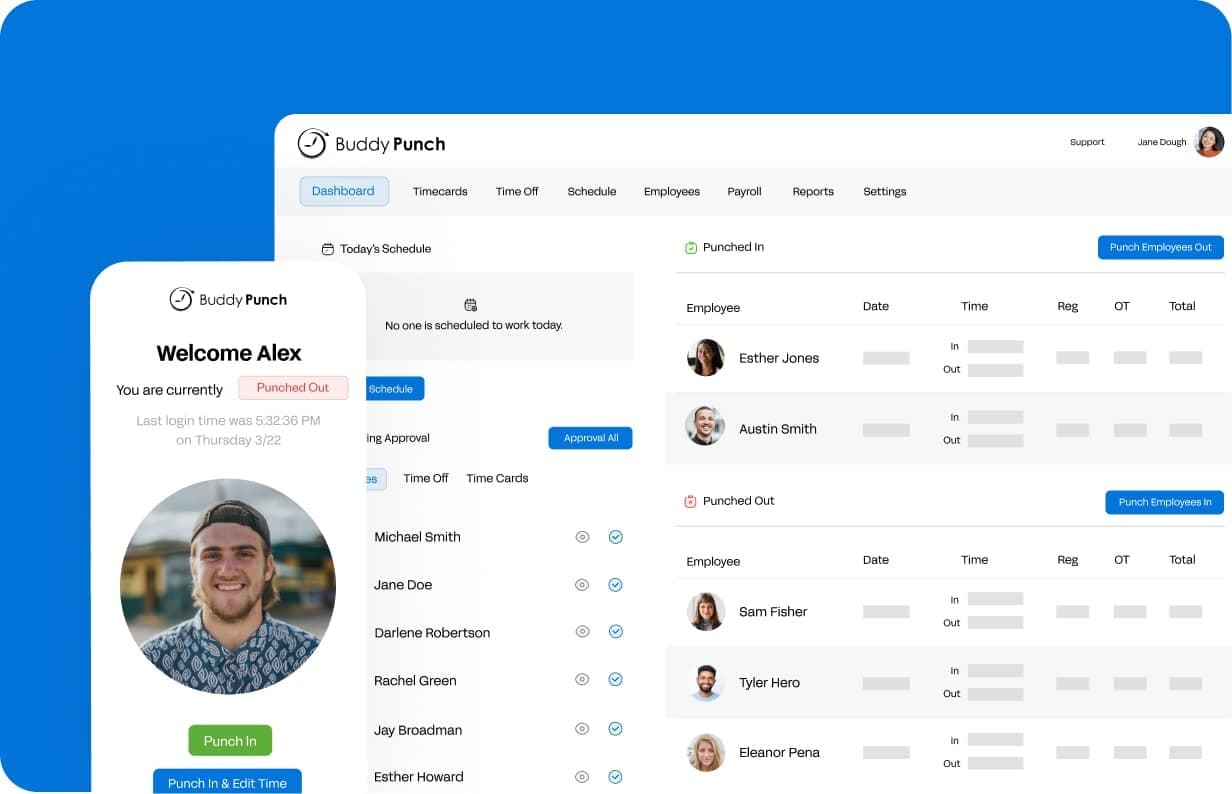
Buddy Punch is a cloud-based time clock covering GPS, drag-and-drop scheduling, PTO accrual, and payroll integrations with QuickBooks, Paychex, and ADP. It sits in a useful middle ground — more operational depth than Clockify or Toggl, less complexity and surveillance overhead than Hubstaff.
Scheduling and geofencing require add-ons or higher-tier plans on the Starter level, which is worth knowing before you sign up. The $19 base fee plus $4.49/user/month (annual) pricing also doesn't favor very small teams — solo operators or pairs will find the per-seat model less attractive than flat-rate alternatives.
Pricing: Starter: $19/month base fee + $4.49/user/month (annually). Scheduling and geofencing require higher plans or add-ons.
What real users say:
Buddy Punch barely shows up in productivity or freelance discussions — it lives almost entirely in field-service and hourly workforce threads. In r/software and r/CRMSoftware, users recommend it specifically for managing people across locations who are tired of employees clocking in for each other. One commenter said their team of five had been using it for a few years and had never switched — "ticks all the right boxes for us." In r/TimeTrackingSoftware, cost is the main question when Buddy Punch comes up: it gets compared to Jibble frequently in those threads, especially once Jibble's free plan enters the conversation.
Our take: For a 5–30 person shift-based team, it delivers. Read the plan tiers carefully before signing up.
9. Connecteam — Best for Deskless and Field Service Teams

Connecteam is a mobile-first time tracking and operations tool built for teams that don't sit at desks — cleaning crews, security teams, maintenance workers, field service technicians spread across multiple sites. GPS time clock, digital checklists, forms, and in-app communication all live in one app.
The pricing model is what makes it stand out for larger deskless crews. Operations Basic is $29/month (annually) for the first 30 users, with just $0.80/month per additional user after that. For a business with 40 field workers, that math is very different from per-user pricing models. Geofencing is real but sits behind a higher-tier plan — it's not included on Operations Basic, which surprises some users.
Pricing: Free plan for up to 10 employees. Operations Basic: $29/month (annually) for first 30 users, then $0.80/month per additional user.
What real users say:
In r/smallbusiness and r/CRMSoftware, Connecteam comes up specifically for field teams that need more than a timer. One r/CRMSoftware commenter described it as "straightforward — no complicated HR system, just simple time tracking and basic reports. The relief of not having to chase timesheets every week was huge for our team." G2 reviewers managing cleaning companies and security firms describe it as the first tool where cost didn't balloon as the team grew. The learning curve on initial setup is the most common criticism, especially for managers building out checklists and scheduling workflows for the first time.
Our take: Built for teams that don't sit at desks. If that's your business, the flat pricing and mobile-first design make it one of the strongest options on this list.
How Clockify, QuickBooks Time, and Connecteam Compare
Clockify
- Best for: Agencies, consultants, freelancers
- Free plan: Yes, up to 5 users, unlimited projects
- Starting price: $3.99/user/month (annual)
- GPS: Paid plans only
- Scheduling: Paid plans only
- Payroll integration: Via integrations (not native)
QuickBooks Time
- Best for: Field and mobile teams using QuickBooks
- Free plan: No
- Starting price: $20/month + $10/user/month (Premium)
- GPS: Yes, core feature
- Geofencing: Elite plan only
- Payroll integration: Native QuickBooks sync
- Shift scheduling: Yes
Connecteam
- Best for: Deskless and field service teams
- Free plan: Yes, up to 10 employees
- Starting price: $29/month for first 30 users
- GPS: Yes, GPS time clock
- Geofencing: Higher plans only
- Payroll integration: Via integrations
- Shift scheduling: Yes
How Do You Choose the Right Time Tracking Software for Your Small Business?
Pick the wrong tool and you're not just out the subscription cost. You've added friction for your team and more cleanup for yourself. The right choice comes down to three questions.
1. Start with your team type.
Different businesses have fundamentally different needs. Shift-based hourly workers — restaurants, retail, healthcare — need scheduling and time tracking in the same place, which points toward Homebase, Connecteam, or Buddy Punch. Project-based or billable-hours businesses need project tracking and invoicing, which means Clockify, Harvest, or Toggl Track. Remote teams need visibility into how time is spent, not just when — Hubstaff or QuickBooks Time. Field service businesses need location verification above everything else — Connecteam, QuickBooks Time, or Buddy Punch.
If you're unsure which category you're in, ask one question: are your employees working shifts with fixed start and end times, or logging hours against client projects? That single question narrows the field quickly.
2. Check your integrations before you commit.
Time tracking that doesn't connect to your payroll is just more manual work in a different format. Before you sign up for anything, confirm it works with what you already use — QuickBooks, Gusto, ADP, Paychex, Square Payroll, or your POS.
A native integration, where hours flow directly into your payroll run without re-entry, is worth paying for. A CSV export is better than nothing, but it still means someone is touching the data manually.
3. Know what "free" actually means.
Free plans vary widely. Clockify covers up to 5 users. Jibble covers unlimited users for attendance. Most others are entry-level tiers with clear feature ceilings. Paid plans are worth it when you need GPS verification, direct payroll integration, or compliance features like overtime alerts and break tracking.
Scheduling, time tracking, and payroll in one place, for one price per location. If your team is hourly and shift-based, Homebase covers all three, free to start for one location and up to 10 employees.
What Do Small Businesses Need to Know About Time Tracking and Labor Law?
Timekeeping isn't just an operational convenience. It's a legal requirement. The Fair Labor Standards Act (FLSA) sets specific record-keeping obligations for employers, and most states layer additional requirements on top.
Under the FLSA, employers must track hours worked each day and each workweek, the basis on which wages are paid, and total wages paid each pay period. Payroll records must be kept for 3 years; timecards, timesheets, and work schedules for 2 years.
Source: U.S. Department of Labor: dol.gov/agencies/whd/fact-sheets/21-flsa-recordkeeping.
State rules can be stricter. California overtime applies after 8 hours in a workday. Alaska also has daily overtime requirements. Visit your state's Department of Labor for the rules that apply to your business.
Time tracking software helps you stay compliant with automated overtime alerts, break tracking, audit trails, and secure digital record storage. The businesses most exposed to wage claims are usually the ones still running on paper — not because they're cutting corners, but because manual systems create gaps they don't even see.
Frequently Asked Questions About Time Tracking Software for Small Businesses
How much does time tracking software cost for a small business?
Costs range from $0 to around $20/user/month depending on features. Full-featured options with GPS, payroll integration, and compliance tools typically start at $4–$10/user/month. Per-location pricing models can be more affordable for businesses with larger hourly teams at one location.
Can employees track time on their phones?
Yes. Most time tracking tools built for small businesses include mobile apps. Employees clock in and out from their phones, and GPS-enabled tools can verify they're at the right location when they punch in. That reduces time theft without requiring a mobile time clock at every site.
Does time tracking software integrate with payroll?
Most do. Popular integrations include QuickBooks, Gusto, ADP, Paychex, and Square Payroll. When hours sync automatically to payroll, you eliminate manual re-entry and the errors that come with it. Always verify your specific payroll system is supported before committing.
How do I get employees to actually use time tracking software?
Keep it simple and walk your team through it on day one. Use a tool with a mobile app and automatic reminders. Clear written policies help too — employees are more likely to follow the process when expectations are spelled out rather than assumed.
Is time tracking software worth it for very small businesses?
Yes, even for a team of two. It prevents overpayment, makes payroll faster, and creates the documentation you need if a wage dispute ever comes up. A free tool is better than a spreadsheet, and a paid tool is better than both for growing teams.
What's the difference between timesheet software and time tracking software?
The terms are often used interchangeably. Timesheet software typically refers to tools that collect and organize hours for payroll. Time and attendance software can include real-time clock-in, GPS, project tracking, and compliance features. Most modern tools do both.
What do small business owners on Reddit recommend for time tracking?
Recommendations vary by business type across threads in r/smallbusiness, r/software, and r/TimeTrackingSoftware. Clockify and Toggl Track appear frequently for freelancers and solo operators. Jibble and Connecteam come up in hourly team and field service discussions. Hubstaff is regularly debated: recommended by managers, flagged as surveillance-heavy by employees. The consistent takeaway: the right tool depends on whether you're managing projects or shifts.
What's the best free time tracking software for a small business?
Based on threads in r/smallbusiness and r/CRMSoftware: Clockify is strongest for project-based tracking, with unlimited projects for up to 5 users. Jibble is strongest for attendance and biometric verification, with unlimited users and GPS at no cost. Connecteam covers up to 10 employees for basic scheduling and time tracking. None of the free plans include full payroll sync.
The Right Tool Does One Thing Well: It Fits
Clockify is the best free tracker if you bill by the hour. QuickBooks Time is the obvious pick if your field team runs on Intuit. Connecteam handles deskless crews better than almost anything else. Picking the wrong one doesn't just waste money — it adds friction for your team and more manual work for you.
If you're running a shift-based business with hourly employees, you probably need more than a time tracker. You need scheduling, time tracking, payroll, and compliance tools that work together from clock-in to payday, without stitching three separate apps together.
That's the problem Homebase was built to solve. One workflow, one app, per-location pricing instead of per head. Free for one location and up to 10 employees. Paid plans that scale with your locations, not your headcount. Start tracking time for free.
